A Deep Dive into Codex Windows Sandbox
OpenAI recently published a writeup on their new Windows sandbox design. The post covers the areas they explored, the options they rejected, such as Windows Sandbox and AppContainer, and why they focused on a multi-layer approach to balance usability and security. I found the implementation interesting because Windows gives you a lot of options for securing users, securable objects, and network connections. Instead of relying on one Windows capability, Codex pulls several of them together, including restricted tokens and synthetic SIDs, new users and a new group, and Firewall/WFP rules.
This post is my dive into those internals. OpenAI’s post explains the high-level architecture; my goal is to go a layer deeper into how the sandbox shows up on an actual Windows endpoint: with the filesystem, in tokens, in ACLs, in network rules, and in auditing/detection opportunities.
This is not a bypass or exploitation post. The goal is to understand the implementation choices and security boundaries, not to walk through ways to break out of them.
Let’s dive in 😎
Setup
Before we dive in, it is important to know that Codex has had two Windows sandbox designs. The prototype “unelevated” sandbox relied on synthetic SIDs and write-restricted tokens while still running commands under the real Windows user. The newer “elevated” sandbox keeps the restricted-token model, but adds dedicated local sandbox users, an elevated setup helper, a command-runner binary, filesystem ACL setup, and user-scoped network controls. This post focuses on the elevated sandbox.
The setup phase is mostly about preparing the local machine so Codex can launch future commands inside that elevated sandbox. In this section, I only want to cover the two setup artifacts that make the rest of the implementation easier to understand: the files Codex creates under the real user’s .codex directory, and the local sandbox users it provisions.
The more interesting enforcement pieces, such as restricted tokens, synthetic SIDs, filesystem ACEs, command execution, and Firewall/WFP rules, are covered later in the execution section. If you want to reproduce the setup side yourself, watch codex-windows-sandbox-setup.exe with ProcMon or similar tooling; it performs most of the local user, file, ACL, credential, and network-policy setup work.
Files
During setup, Codex creates several local artifacts under the real user’s .codex directory. The exact names can vary by version, but in the build I tested the interesting ones were:
- .sandbox
- .sandbox-secrets
- sandbox_users.json
- setup_marker.json
- sandbox.log
- .sandbox-bin
- codex-command-runner-<version>.exe
- cap_sid
These files support the elevated sandbox model described in OpenAI’s Windows sandbox writeup. Codex needs a setup phase because the final command does not run directly as the real Windows user. Instead, Codex creates dedicated sandbox users, stores their credentials locally using DPAPI-protected state, installs a command-runner binary, and persists the synthetic SID configuration used for restricted-token filesystem checks.
The most interesting files are:
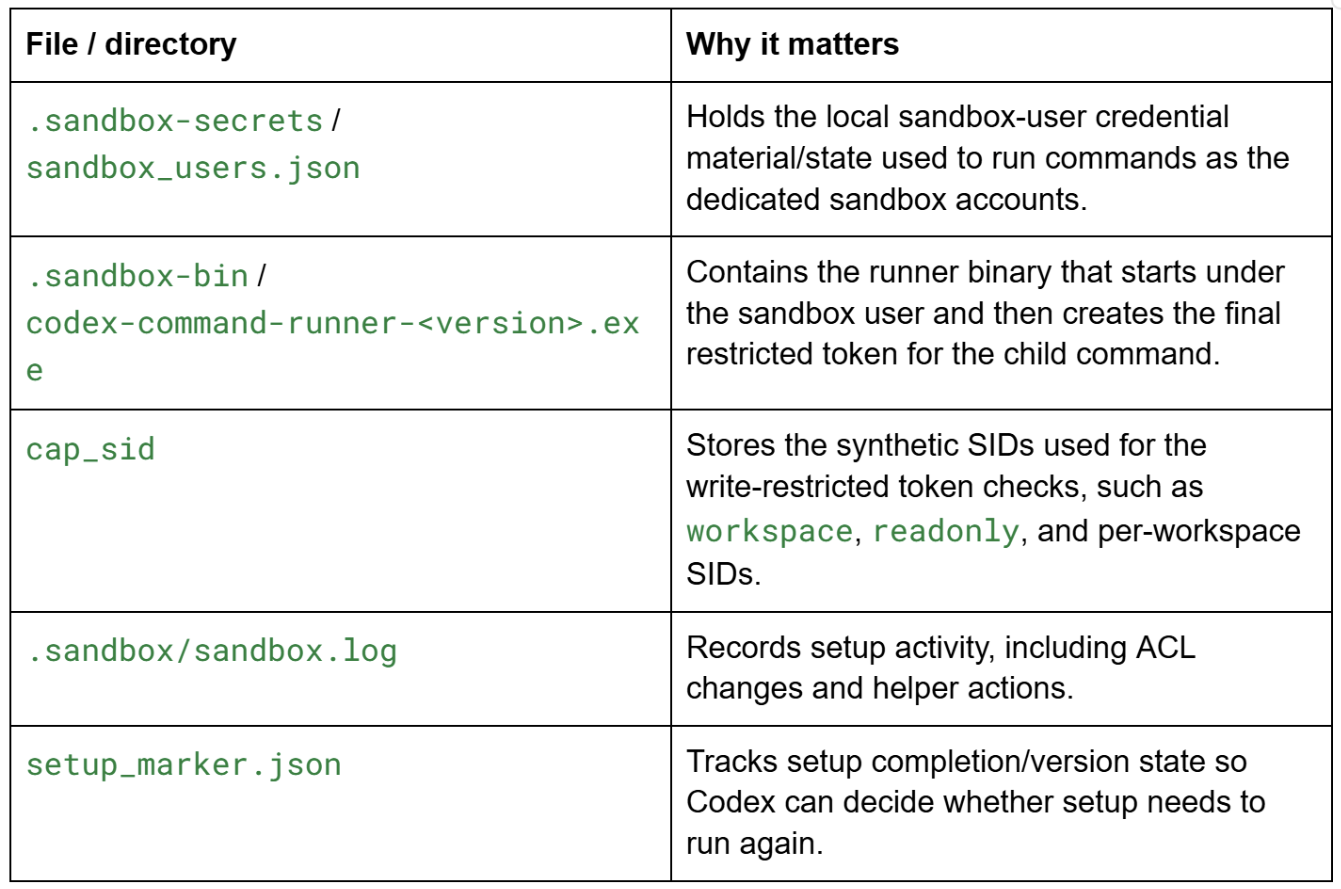
One detail that lines up with the OpenAI writeup is the read-ACL setup. Once Codex moved to dedicated sandbox users, those users no longer automatically had the same read access as the real Windows user. To compensate, setup grants read/execute access to commonly needed locations where necessary. You can see this activity in .codex\.sandbox\sandbox.log.
Interesting examples from the build I tested included paths such as:
- C:\Users\
.codex - C:\Users\
\AppData - C:\Users\
\Desktop - C:\Users\
\Documents - C:\Users\
\Downloads - C:\Users\
\NTUSER.DAT
Lastly, there are named pipes created. Namely for:
- codex-ipc
- codex-runner-<value>-in
- codex-runner-<value>-out
- codex-browser-use-GUID
The codex-runner ones are the most interesting and I’ll dive into that under the execution section.
Users
When the sandbox is created there are two new users created -
- CodexSandboxOffline
- CodexSandboxOnline
These users are added to the CodexSandboxUsers group. These users are real users and are used when a sandbox execution takes place. As the names suggest, these two uses run depending on network access (sandbox_read_only.network_access=true). For example — say I want to run powershell.exe from the sandbox and don’t specify the above I get:
codex -c 'sandbox_mode="read-only"' sandbox windows -- whoami /user desktop-e1erjpv\codexsandboxoffline S-1-5-21-2600164207-787455312-425709766-1006
However, if I specify I get the following:
codex -c 'sandbox_mode="workspace-write"' -c 'sandbox_workspace_write.network_access=true' sandbox windows -- whoami /user desktop-e1erjpv\codexsandboxonline S-1-5-21-2600164207-787455312-425709766-1007
You’ll notice that I had to specify workspace-write for the online user, this is because network access is denied when the active mode is read-only:
codex -c 'sandbox_mode="read-only"' -c 'sandbox_workspace_write.network_access=true' sandbox windows -- whoami /user desktop-e1erjpv\codexsandboxoffline S-1-5-21-2600164207-787455312-425709766-1006
When these users are created, their credentials are stored in:
.codex\.sandbox-secrets\sandbox_users.json:
cat .\.codex\.sandbox-secrets\sandbox_users.json
{
 "version": 5,
 "offline": {
 "username": "CodexSandboxOffline",
 "password": "AQAAANCMnd8BFdERjH<redacted>
 },
 "online": {
 "username": "CodexSandboxOnline",
 "password": "AQAAANCMnd8BFdERjHoAwE/Cl<redacted>"
 }
}
These credentials are DPAPI encrypted + Base64 encoded. When a process is created this file is read to get one of the sandboxed users credentials.
This file is restricted where the sandbox users themselves can not read from them:
PS > $acl = Get-Acl .\.codex\.sandbox-secrets\sandbox_users.json
PS > $FileSystemRights = ConvertFrom-SddlString -Sddl $acl.Sddl -Type FileSystemRights
PS > $FileSystemRights.DiscretionaryAcl
DESKTOP-E1ERJPV\CodexSandboxUsers: AccessDenied Inherited (CreateDirectories, Delete, ExecuteKey, GenericExecute, GenericRead, GenericWrite, ListDirectory, Modify, Read, ReadAndExecute, ReadAttributes, ReadExtendedAttributes, ReadPermissions, Synchronize, Traverse, Write, WriteAttributes, WriteData, WriteExtendedAttributes, WriteKey)
...
DESKTOP-E1ERJPV\CodexSandboxUsers: AccessAllowed Inherited (GenericWrite, ListDirectory, Read, ReadAndExecute, ReadAttributes, ReadExtendedAttributes, ReadPermissions, Synchronize, Traverse)
There is a Denied and an Allowed ACE, but on Windows — Denied Ace’s always take precedence. I am not sure why they have an allowed ACE for the CodexSandboxUsers, I think this could be removed.
Execution
Restricted Tokens
One of the main mechanisms that the codex sandbox execution is using is “write” restricted tokens. Restricted tokens are access tokens (primary or impersonation) that have been “filed” down so to speak. Restricted Tokens support the following operations:
- Disabling Groups
- Removing Privileges
- Adding restricted SIDs
This is a common way to secure / harden the access check process to securable objects. Chromium does this with their sandbox, and James Forshaw dives into restricted tokens a bit with this bug.
These restricted tokens have the same basic structure as a normal access token. One way to identify a restricted token is by checking whether RestrictedSidCount > 0. In fact, this is the same check used by the IsTokenRestricted() function. For example, below is an output of a cmd.exe process with a restricted token from a personal POC I made:
dx (nt!_TOKEN*)0xffff838b98f255f0
(nt!_TOKEN*)0xffff838b98f255f0 : 0xffff838b98f255f0 [Type: _TOKEN *]
 [+0x000] TokenSource [Type: _TOKEN_SOURCE]
 [+0x010] TokenId [Type: _LUID]
 [+0x018] AuthenticationId [Type: _LUID]
 [+0x020] ParentTokenId [Type: _LUID]
 [+0x028] ExpirationTime : {9223372036854775807} [Type: _LARGE_INTEGER]
 ...
 [+0x080] RestrictedSidCount : 0x3 [Type: unsigned long]
...
 [+0x0a0] RestrictedSids : 0xffff838b98f25b70 [Type: _SID_AND_ATTRIBUTES *]
 [+0x0a8] PrimaryGroup : 0xffff838b927ded80 [Type: void *]
 [+0x0b0] DynamicPart : 0xffff838b927ded80 : 0x501 [Type: unsigned long *]
 [+0x0b8] DefaultDacl : 0xffff838b927ded9c [Type: _ACL *]
 [+0x0c0] TokenType : TokenPrimary (1) [Type: _TOKEN_TYPE]
 [+0x0c4] ImpersonationLevel : SecurityAnonymous (0) [Type: _SECURITY_IMPERSONATION_LEVEL]
 [+0x0c8] TokenFlags : 0x2a18 [Type: unsigned long]
 [+0x0cc] TokenInUse : 0x1 [Type: unsigned char]
 [+0x0d0] IntegrityLevelIndex : 0xe [Type: unsigned long]
 [+0x0d4] MandatoryPolicy : 0x3 [Type: unsigned long]
 [+0x0d8] LogonSession : 0xffff838b929428e0 [Type: _SEP_LOGON_SESSION_REFERENCES *]
 [+0x0e0] OriginatingLogonSession [Type: _LUID]
 [+0x0e8] SidHash [Type: _SID_AND_ATTRIBUTES_HASH]
 [+0x1f8] RestrictedSidHash [Type: _SID_AND_ATTRIBUTES_HASH]
 ...
You can see the RestrictedSidCount is 0x3, which means I have 3 restricted SIDs:
dps 0xffff838b98f25b70 L6
ffff838b`98f25b70 ffff838b`98f25c88
ffff838b`98f25b78 00000000`00000007
ffff838b`98f25b80 ffff838b`98f25ca4
ffff838b`98f25b88 00000000`00000007
ffff838b`98f25b90 ffff838b`98f25cb8
ffff838b`98f25b98 00000000`00000007
0: kd> !sid ffff838b`98f25c88
SID is: S-1-5-21-2600164207-787455312-425709766-1001
0: kd> !sid ffff838b`98f25ca4
SID is: S-1-5-5-0-457350
0: kd> !sid ffff838b`98f25cb8
SID is: S-1-1-0
When an access check happens on a securable object, such as a file, Windows first evaluates the token’s normal enabled SIDs. For a write-restricted token, Windows also evaluates the token’s restricted SID list for write-style access. The write is granted only if the normal SID check and the restricted SID check both allow the requested access.
Here is a simple example. The folder ACL grants FullControl to SYSTEM and BUILTIN\Administrators, but only ReadAndExecute to TestUser:
(Get-Acl -Path .\RestrictedTokenFolder\).Access
FileSystemRights : FullControl
AccessControlType : Allow
IdentityReference : NT AUTHORITY\SYSTEM
IsInherited : False
InheritanceFlags : ContainerInherit, ObjectInherit
PropagationFlags : None

FileSystemRights : FullControl
AccessControlType : Allow
IdentityReference : BUILTIN\Administrators
IsInherited : False
InheritanceFlags : ContainerInherit, ObjectInherit
PropagationFlags : None

FileSystemRights : ReadAndExecute, Synchronize
AccessControlType : Allow
IdentityReference : DESKTOP-E1ERJPV\TestUser
IsInherited : False
InheritanceFlags : ContainerInherit, ObjectInherit
PropagationFlags : None

PS C:\Users\TestUser\Desktop> echo hello > RestrictedTokenFolder\test.txt

PS C:\Users\TestUser\Desktop> ls .\RestrictedTokenFolder\
 Directory: C:\Users\TestUser\Desktop\RestrictedTokenFolder
Mode LastWriteTime Length Name
 - - - - - - - - - - - - - -
-a - - 5/18/2026 6:31 AM 16 test.txt

PS C:\Users\TestUser\Desktop> .\restricted-token-etw-poc.exe - include-everyone - cmd "powershell.exe"
..

PS C:\Users\TestUser\Desktop> echo hello > RestrictedTokenFolder\test2.txt
out-file : Access to the path 'C:\Users\TestUser\Desktop\RestrictedTokenFolder\test2.txt' is denied.
The unrestricted shell can write to the folder because the user is an administrator, so the normal access check can succeed through the enabled BUILTIN\Administrators SID.
The restricted PowerShell process is different. Its token still has BUILTIN\Administrators in the normal SID list, but Administrators is not present in the restricted SID list. The restricted-side check only has SIDs such as TestUser, the logon SID, and Everyone, and none of those have write access to the folder. Because the second check fails, the write is denied.
Codex creates restricted tokens with WRITE_RESTRICTED, which means the additional restricted-SID access check is used for write-style access, not necessarily every read/open. This matches OpenAI’s Windows sandbox writeup: writes must pass both the normal identity check and the restricted SID check.
As I mentioned before Codex creates new users and a new group (CodexSandboxUsers) for their sandbox:
- CodexSandboxOffline
- CodexSandboxOnline
However, Codex also wants to limit access between “workspaces” (folders) that its sandbox users run in, so one workspace cannot freely interact with another. It does this with synthetic SIDs: SIDs that do not correspond to a real user or group, but can still be placed in ACLs and in a sandboxed process’s restricted token to force an extra access-check condition. One important distinction: these are not AppContainer capability SIDs in the token’s Capabilities field. In Codex’s Windows sandbox implementation, these synthetic SIDs are placed in the token’s RestrictedSids list, so they participate in the restricted/write-restricted token access check. You can see the synthetic SID values in C:\Users\<user>\.codex\cap_sid. In the build I tested, there are three categories:
- workspace (generic)
- readonly
- workspace_by_cwd (individual)
Depending on the sandbox policy mode, Codex chooses which synthetic SID(s) to place in the token’s RestrictedSids list. For example, if the cap_sid file holds:
{"workspace":"S-1-5-21-3157231441-206905630-1953547044-537118175",
"readonly":"S-1-5-21-4171549676-2019787252-3436711678-4062263990",
"workspace_by_cwd":{
  "c:/users/testuser/workspacea":"S-1-5-21-1178043831-743525415-1975136256-3476219301",
  "c:/users/testuser/workspaceb":"S-1-5-21-2377099548-1866996717-4003200375-3752902734"
  }
}
Read-Only
When you run Codex with sandbox_mode=read-only, the sandboxed child token receives the readonly synthetic SID, for example S-1-5-21-4171549676-2019787252-3436711678-4062263990.
That sounds confusing, but it makes sense why they implemented it this way. Under Codex’s Windows sandbox implementation, the token is created with WRITE_RESTRICTED, so the restricted SID list is not acting as a general read check. Instead, it gives Windows a second SID list to consult for write-style access checks. A write must be allowed by the normal token SIDs and also by at least one applicable restricted SID.
In read-only mode, Codex places the synthetic readonly SID in that restricted SID list. Since ordinary filesystem ACLs should not contain write-allow ACEs for this random synthetic SID, the restricted-side write check fails and the process behaves as read-only. If Codex left the restricted SID list empty, there would be no meaningful restricted-SID write check, which would defeat the purpose of using WRITE_RESTRICTED here.
Write
In the current implementation I looked at, workspace-write adds the active write-root capability SIDs to the restricted token. The command workspace gets a workspace_by_cwd SID, and additional writable roots get path-scoped SIDs from writable_root_by_path (I didn’t have this set, but saw this in the code). Here is an example with two different workspaces A & B, where A (S-1-5-21-1178043831-743525415-1975136256-3476219301) can’t write to B (S-1-5-21-2377099548-1866996717-4003200375-3752902734):
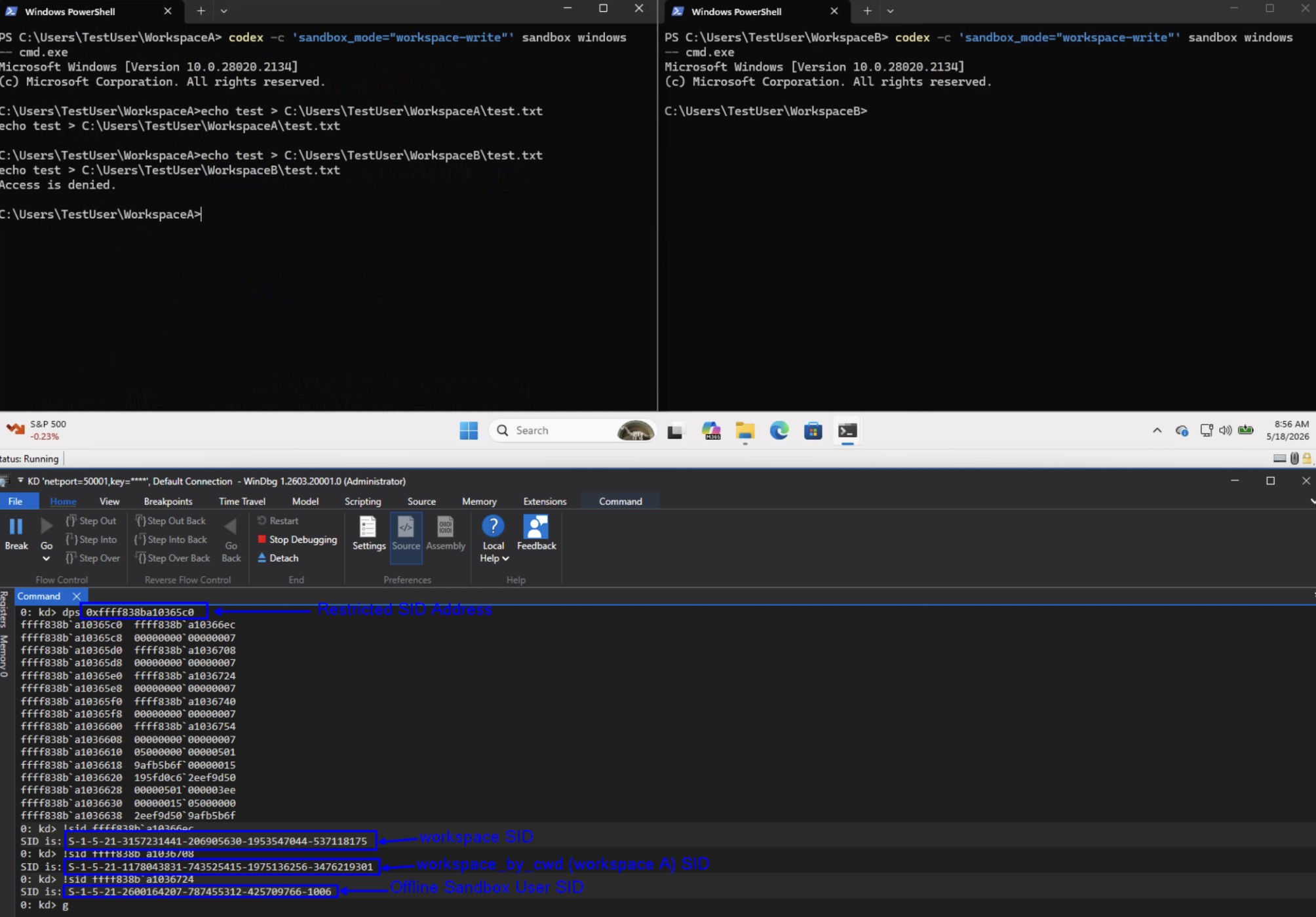
The access will be checked against the restricted token’s synthetic SIDs to make sure they have write access. Note — The restricted-side check succeeds if at least one restricted SID has an allow ACE granting the requested access, assuming no applicable deny ACE blocks it. Codex also includes the logon SID and Everyone in the restricted SID list. That matters because the restricted-side check can succeed if any restricted SID has an applicable allow ACE, assuming no deny ACE blocks it.
Processes
When codex.exe creates a sandboxed process, it first launches the Codex command runner binary. On my machine this was:
C:\Users\<User>\.codex\.sandbox-bin\codex-command-runner-0.131.0-alpha.9.exe
The command runner is launched as one of the dedicated sandbox users. From there, the runner creates the requested child process with the restricted token.
One interesting detail is that, like other files under .codex, the command runner binary is accessible to the real user who installed Codex as a medium integrity level process.
When a sandbox process is started, codex.exe also creates two named pipes for communication between the parent process and the command runner. For example (these values change):
C:\Users\TestUser\.codex\.sandbox-bin\codex-command-runner-0.131.0-alpha.9.exe -- pipe-in=\\.\pipe\codex-runner-8a2a94df25252c7dc89dc74f4c4b2478-in -- pipe-out=\\.\pipe\codex-runner-8a2a94df25252c7dc89dc74f4c4b2478-out
The parent creates the server-side named pipes, launches the command runner as the selected sandbox user, and waits for the runner to connect. The named pipe security descriptor grants access to that specific sandbox user SID, not the broader CodexSandboxUsers group. This communication is used for Codex to send the command execution request to the runner and for the runner to return the command response.
A useful way to think about this process chain is:

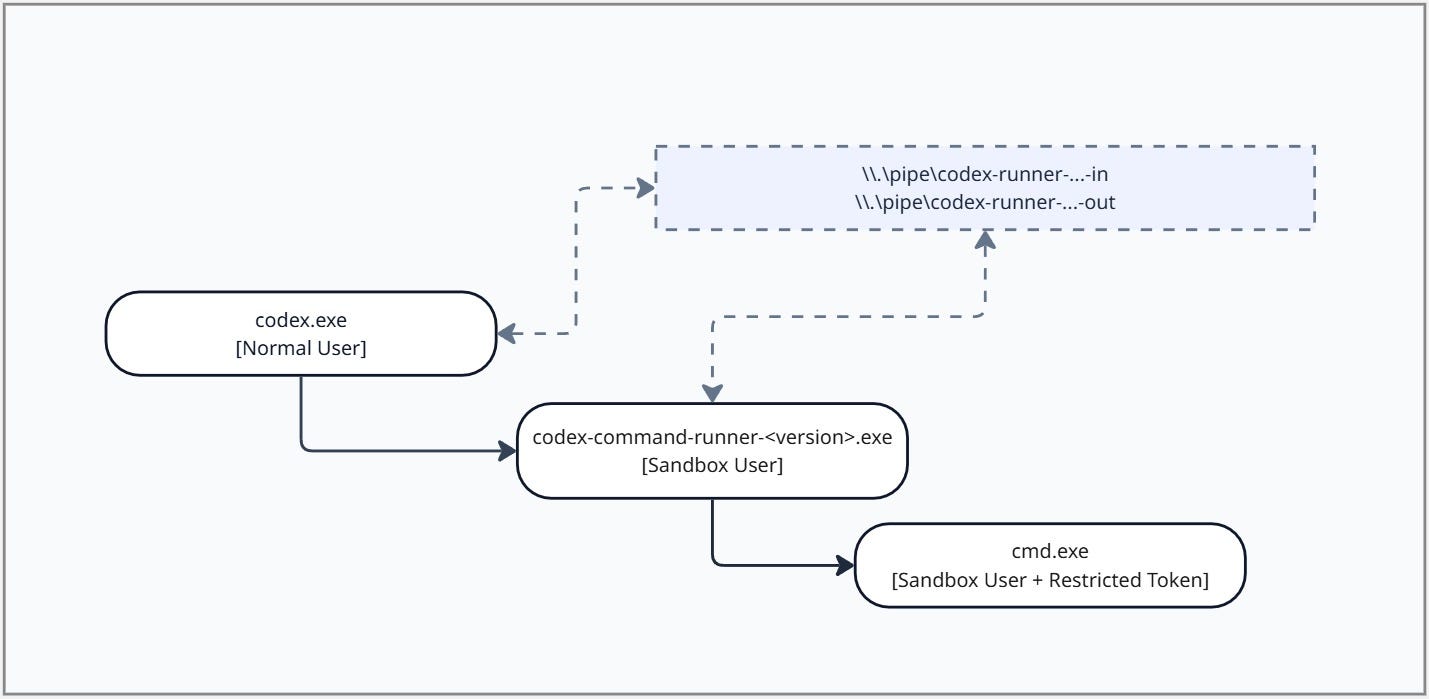
The command runner itself is not the final sandbox boundary. It is acting as the bridge process that starts on the sandbox-user side of the Windows logon boundary. Once it is running as the selected sandbox user, it opens its own process token, creates the restricted/write-restricted token, and then launches the requested child process with that restricted token.
Understanding this split is important because the boundary is not just “Codex launched a process.” There are two transitions — first from the real user to the sandbox user, and then from the sandbox user token to the restricted token used by the actual child command. The restricted child process is the main security boundary. Escaping from that constrained token context into an unrestricted sandbox-user context, or back into the real user context, would mean crossing the sandbox boundary.
Firewall/WFP
Another layer Codex uses for sandboxing is network filtering. Of the two codex sandbox users the offline user (CodexSandboxOffline) is supposed to fail closed for network activity. To do that, Codex installs user-scoped network controls through WFP and Windows Firewall. Windows Firewall rules are themselves backed by WFP, so depending on how you inspect the system you may see both directly installed WFP filters and firewall-created WFP filters.
On my machine I noticed that the sandbox setup resulted in 18 deny network related rules — 12 WFP rules and 6 Windows Firewall rules.
All of these deny rules were scoped to CodexSandboxOffline, not CodexSandboxOnline. That means they are not global machine-wide network blocks. They apply when the process token belongs to the offline sandbox account.
The directly installed WFP filters blocked specific traffic classes:
ICMP
codex_wfp_icmp_assign_v4ALE_RESOURCE_ASSIGNMENT_V4 — ICMP v4codex_wfp_icmp_assign_v6ALE_RESOURCE_ASSIGNMENT_V6 — ICMP v6codex_wfp_icmp_connect_v4ALE_AUTH_CONNECT_V4 — ICMP v4codex_wfp_icmp_connect_v6ALE_AUTH_CONNECT_V6 — ICMP v6
DNS
codex_wfp_dns_53_v4ALE_AUTH_CONNECT_V4 — remote port 53codex_wfp_dns_53_v6ALE_AUTH_CONNECT_V6 — remote port 53codex_wfp_dns_853_v4ALE_AUTH_CONNECT_V4 — remote port 853codex_wfp_dns_853_v6ALE_AUTH_CONNECT_V6 — remote port 853
SMB
codex_wfp_smb_139_v4ALE_AUTH_CONNECT_V4 — remote port 139codex_wfp_smb_139_v6ALE_AUTH_CONNECT_V6 — remote port 139codex_wfp_smb_445_v4ALE_AUTH_CONNECT_V4 — remote port 445codex_wfp_smb_445_v6ALE_AUTH_CONNECT_V6 — remote port 445
The Windows Firewall-backed rules added broader outbound and loopback restrictions:
Outbound traffic
codex_sandbox_offline_block_outboundALE_AUTH_CONNECT_V4 — non-loopback IPv4 outboundcodex_sandbox_offline_block_outboundALE_AUTH_CONNECT_V6 — non-loopback IPv6 outbound
Loopback traffic
codex_sandbox_offline_block_loopback_tcpALE_AUTH_CONNECT_V4 — IPv4 loopback TCP ports 1–65535codex_sandbox_offline_block_loopback_tcpALE_AUTH_CONNECT_V6 — IPv6 loopback TCP ports 1–65535codex_sandbox_offline_block_loopback_udpALE_AUTH_CONNECT_V4 — IPv4 loopback UDPcodex_sandbox_offline_block_loopback_udpALE_AUTH_CONNECT_V6 — IPv6 loopback UDP
The practical result is that a process running as CodexSandboxOffline should be blocked from DNS, DNS-over-TLS, SMB, ICMP, outbound network connections, and loopback TCP/UDP access. But a process running as CodexSandboxOnline is not matched by these offline-user scoped deny rules.
So the model is similar to the restricted token concept mentioned above: Codex is not only relying on “what process is this?” but also on “which sandbox identity is this process running as?” For filesystem access, Codex uses restricted tokens and synthetic SIDs. For network access, Codex uses WFP and firewall filters scoped to the offline sandbox user SID.
Clean Up
One thing I noticed during testing is that uninstalling Codex did not fully clean up the Windows sandbox configurations. After uninstall, several sandbox artifacts were still present on the machine, including the sandbox users, the CodexSandboxUsers group, files under .codex, filesystem ACL changes, and firewall/wfp rules.
In my test environment, I could still execute the codex CLI after uninstalling the app:
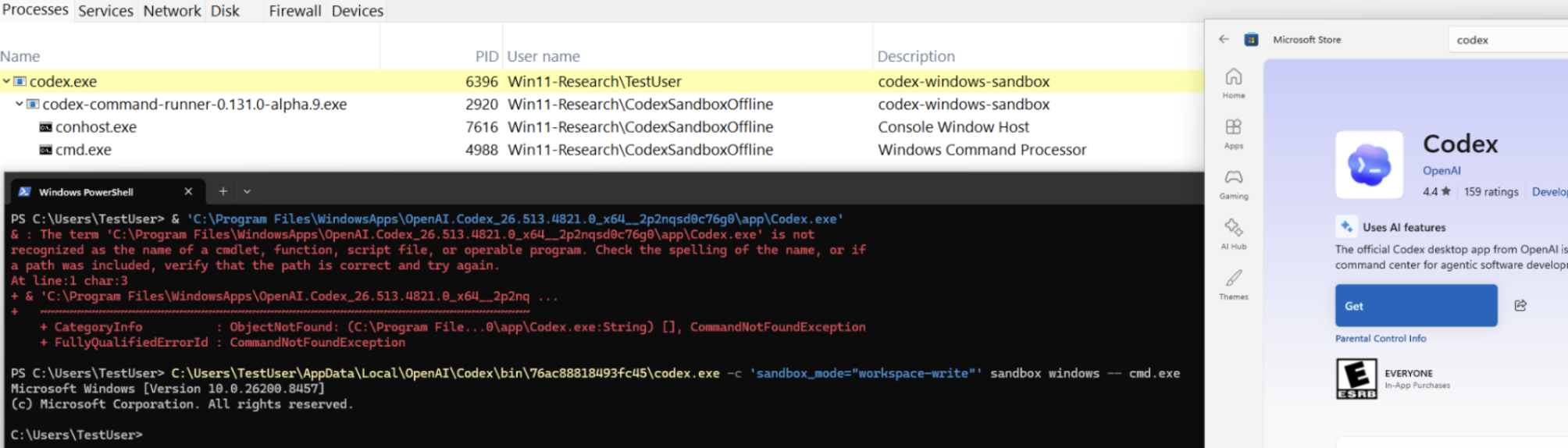
Leveraging the codex cli didn’t require me to reauthenticate either. So, if you have a user who thinks that they removed the application an attacker could leverage it under that user’s account and leverage codex (even without the sandbox).
I also tested modifying some of the leftover sandbox configs, such as usernames and credential-related files. When Codex was reinstalled and setup ran again, it overwrote the user-related sandbox configuration and regenerated the expected state, which was good to see.
That said, I would still like to see a more complete cleanup path during uninstall. Leaving behind local users, groups, ACLs, sandbox secrets, and especially WFP filters can make the system harder to reason about after the product is removed. The WFP filters are the most annoying part here because they are not as easy to inspect or remove as normal Windows Firewall rules.
Auditing
The only logs Codex includes is within their sandbox.log file, which holds all type of information — firewall rules that were set, read access was grented to the sandbox users, and process start information. I will say though — the process start information is minimal at best:
[2026-05-21 08:15:57.952 codex.exe] START: cmd.exe whoami
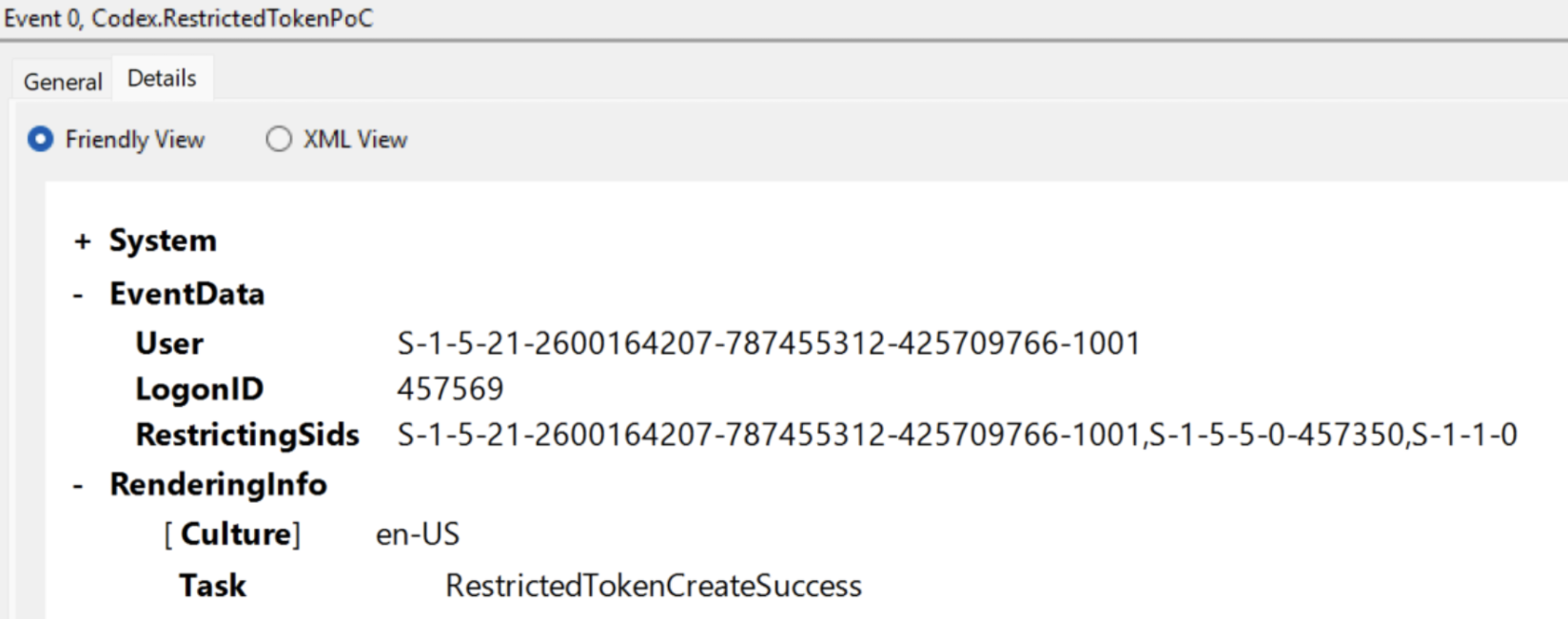
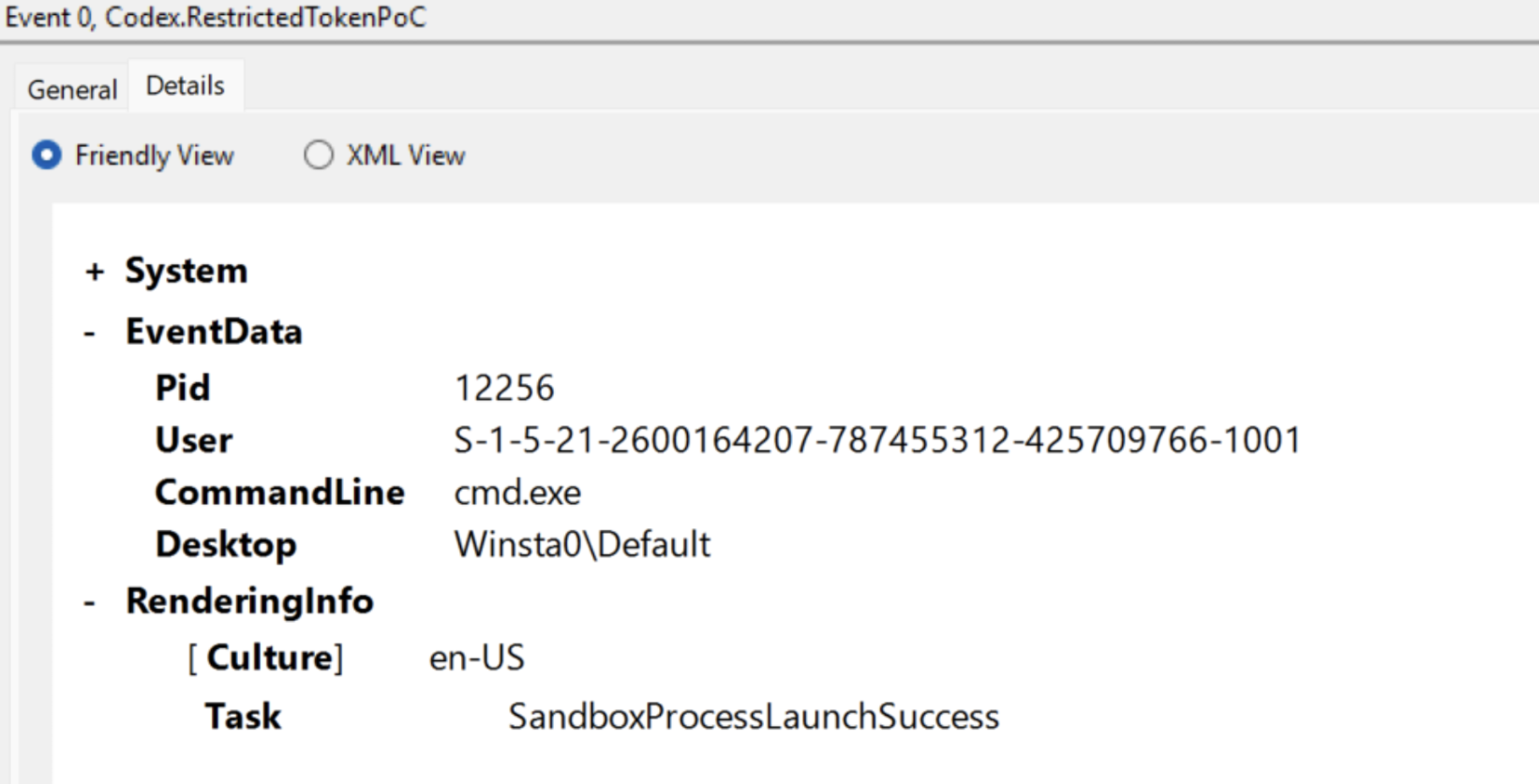
This log isn’t generated on every process start either and being that cmd.exe doesn’t actually launch from codex.exe — the log is a little misleading and I wouldn’t rely on this data for detections, especially since it’s in a massive .log file. That being said — outside of leveraging Windows telemetry mechanisms like Event Tracing for Windows (ETW) or Kernel Callbacks, there isn’t a way to monitor actions performed by the sandbox — processes, users, network connections, etc. This was disappointing to see. I was half expecting to see an ETW provider — either Tracelogging or Manifest that generates events for situations like — a restricted token was created, a sandbox process under x workspace is being generated, network connections from sandbox users/processes, etc. This would allow security products that are trying to implement logging and insights around these AI tools to provide valuable insights to customers.
For fun, I created a POC that creates a restricted token and executes a child process that has ETW hooked up into it to provide some of these insights:
RestrictedTokenCreateSuccess
SandboxProcessLaunchSuccess
SandboxProcessExit
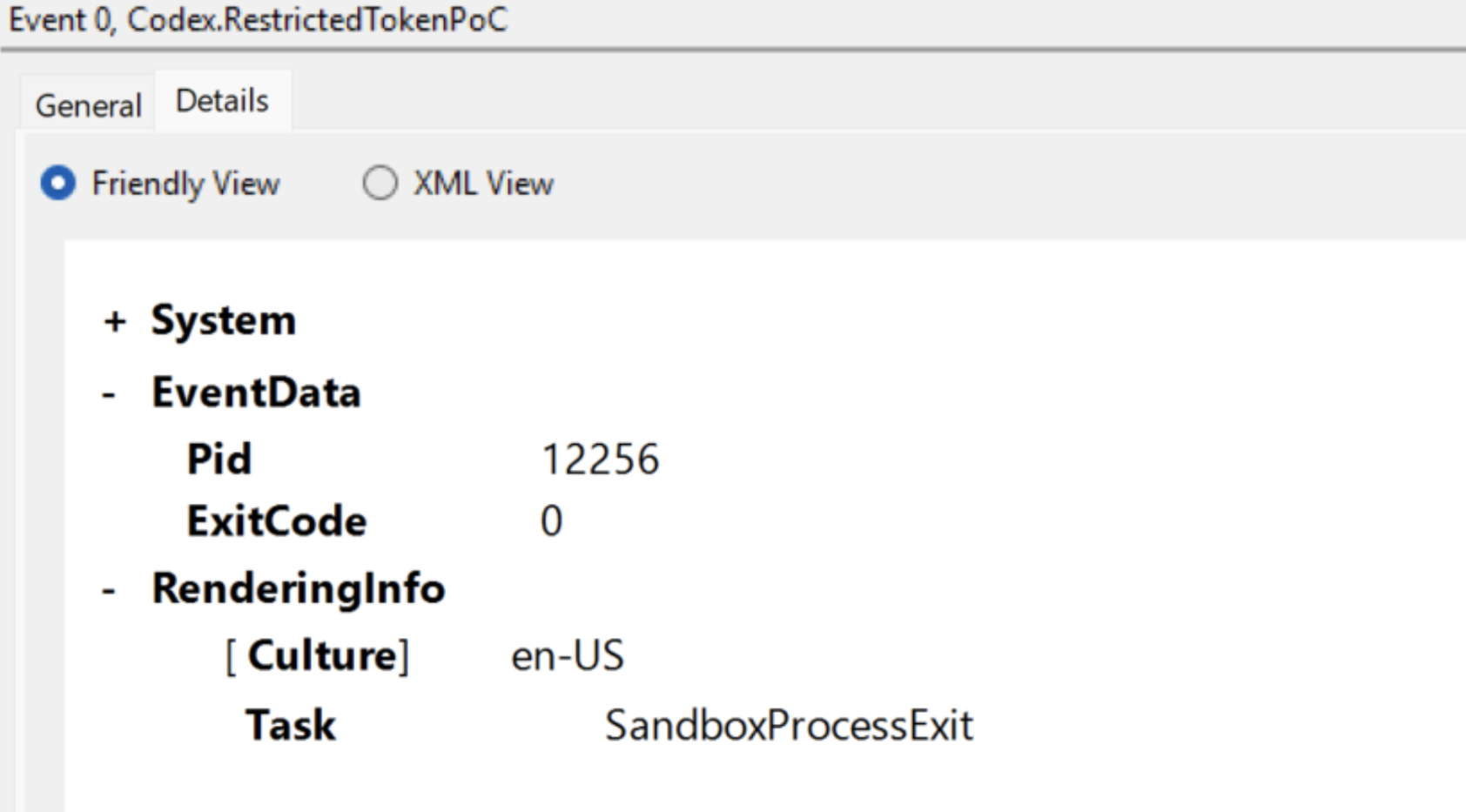
This is only a small subset of events that could be added and although these seem simple — I think these types of events and others would go along way for security products trying to audit these tools.
Detections
I wanted to provide some pseudo detection logic I would implement to watch for breakouts of this sandbox or malicious use cases. The mileage of these detection rules may vary as they haven’t been tested in the wild yet and may require some extra tuning.
Process Detections
Codex Command Runner Outside Expected Sandbox User
IF process.name LIKE "codex-command-runner-*.exe"
AND process.user NOT IN ("CodexSandboxOffline", "CodexSandboxOnline")
THEN alert_or_hunt("Codex spawned a runner process outside the sandbox user context")
Codex Command Runner Child Outside Expected Sandbox User
IF process.parent.name LIKE "codex-command-runner-*.exe"
AND process.user NOT IN ("CodexSandboxOffline", "CodexSandboxOnline")
THEN alert("Child of Codex command runner escaped expected sandbox user identity")
Named Pipe Detections
Unexpected Process Accessed Codex Runner Pipe
IF (
 named_pipe.name LIKE "\\.\pipe\codex-runner-*-in"
 OR named_pipe.name LIKE "\\.\pipe\codex-runner-*-out"
)
AND process.name NOT IN ("codex.exe", "codex-command-runner-*.exe")
Unexpected User Context Accessed Codex Runner Pipe
IF named_pipe.name LIKE "\\.\pipe\codex-runner-*"
AND process.user NOT IN ("CodexSandboxOffline", "CodexSandboxOnline")
THEN alert("Unexpected user context accessed Codex runner pipe")
Network Detections
Network Activity From Codex Offline Sandbox User
IF network.process.user == "CodexSandboxOffline"
THEN alert_or_hunt("Loopback connection from offline Codex sandbox user")
File Detections
Codex Configuration Modified By Unexpected Process
expected_codex_processes = [ "codex.exe", "codex-windows-sandbox-setup.exe", "codex-command-runner.exe" ]
IF (
 file.path MATCHES "%USERPROFILE%\.codex\config.toml"
 OR file.path MATCHES "%USERPROFILE%\.codex\cap_sid"
 OR file.path MATCHES "%USERPROFILE%\.codex\.sandbox-secrets\sandbox_users.json"
)
AND file.operation IN ("write")
AND process.name NOT IN expected_codex_processes
THEN alert_or_hunt("Codex configs modified by unexpected process")
Firewall Detections
Codex Sandbox Firewall Rule Modified
IF firewall_rule.name LIKE "codex_*"
AND operation IN ("delete", "disable", "modify")
AND process.name NOT IN expected_codex_setup_processes
THEN alert("Codex sandbox firewall rule modified")
Codex Direct WFP Filter Modified
IF wfp_filter.name LIKE "codex_wfp_*"
AND operation IN ("delete", "disable", "modify")
AND process.name NOT IN expected_codex_setup_processes
THEN alert("Codex direct WFP filter modified")
Along with these, I would highly recommend looking for correlation opportunities across data sources as it relates to these actions.
Conclusion
So many people are leveraging AI tools, especially on the endpoint. So, it is important to know what is running on your machine, who it is running as, and what security context it carries with it. Attacks often take advantage of weak access controls, excessive privileges, and context switches, which means monitoring behavior around those boundaries matters.
It’s great to see OpenAI leverage so many different Windows concepts to build their own version of a sandbox. My biggest request to OpenAI, and to any other company building these endpoint AI tools, is logging. Defenders need visibility into what command or code was executed, under which sandbox identity, with which policy, and against which workspace. Even basic structured logs around command execution, sandbox mode, network mode, process identity, and blocked actions would go a long way for detection. Having this custom logging alongside what Windows already provides would add richer context for detection opportunities.
I expect more tools to move in this direction soon. Microsoft already appears to be exploring similar ideas in Windows Canary builds, and I do not think Codex will be the last developer agent to need this kind of local isolation. This space is much needed and a long time coming, especially since for the longest time the answer has been to “use WSL.”
Hopefully this writeup was useful as a deeper look at how the Codex Windows sandbox is set up and implemented. If you find anything interesting or have questions, please reach out!
References
- Building a safe, effective sandbox to enable Codex on Windows | OpenAI
- codex/codex-rs/windows-sandbox-rs at main · openai/codex
- You Won’t Believe what this One Line Change Did to the Chrome Sandbox — Project Zero
- Restricted Tokens — Win32 apps | Microsoft Learn
- How AccessCheck Works — Win32 apps | Microsoft Learn
- Security Identifiers | Microsoft Learn