RAG, ICL, and Windows Events: Building a Human-Guided Security Analyst
Introduction
Leveraging AI in the defensive/offensive space has taken off the past couple of years. There has been some great research from Roberto Rodriguez, Max Harley, Dreadnode, and many more that have shown the power of AI and how it can help our industry grow. This had me thinking — how could I learn AI and how could it help enhance some of my research?
Now, I’ll be completely honest — I haven’t been “against” AI, but I do think that it has been used for a lot of simple things and I have noticed a decrease in critical thinking by those in our industry. Due to that — I have been hesitant, but I wanted to change my perspective and my knowledge around the effectiveness AI can have in the industry. I wanted to find something that I could apply AI to that was useful and leveraged a lot of actual AI concepts. My research has always been around Windows Internals & Telemetry — this could be about how to identify telemetry better, finding new telemetry sources for detections, developing those systems to expose them for detections, and analyzing existing data for telemetry.
After a decent amount of thought, I decided I wanted to build a system that could:
- Analyze/Parse EVTX files
- Identify malicious activity through Claude
- Create a way to “teach” my system what it did right and wrong (learnings). I essentially wanted this to use my past experiences to exchange identification.
- Apply those learnings and get better results
So, let me introduce you to — EventSight.
Note: This blog isn’t just a tool release, it’s how I went from not leveraging AI to building this tool and the things I learned along the way. Before I go any further — I do want to give a shoutout to Max Harley, who not only pushed me to do this project but answered a lot of technical questions I had around common AI/LLM architectures and terminology.
Project Architecture
EventSight is an “AI Security Analyst Specialist” POC tool that acts as a security analyst to analyze security events and return malicious activity. EventSight leverages Claude and its inherent security knowledge to identify suspicious activity, with a feedback loop that makes it smarter over time for your specific environment.
Parsing Logs
Parsing the EVTX files was the easy part of this project. Since I work primarily on Windows, I wanted to use native tools rather than a Python library — so either wevtutil.exe or PowerShell. I opted for wevtutil.exe as it was straightforward to work with. EVTX is the Windows Event Log format, replacing the older EVT format. It’s a binary file consisting of a file header followed by chunks of data, each containing a header and event records stored in binary XML format. Any events you see in Event Viewer (Security, Application, etc.) come from EVTX files. ETW traces stored in ETL format are often converted to EVTX for easier parsing. Because these telemetry files can get large, I implemented three filtering approaches:
- Smart filtering — asking Claude’s LLM, based on the event type which Event IDs should be analyzed
- Passing in EventIDs manually — either through a file or in the command-line.
- No Filtering (This could use a lot of “tokens”, so I don’t use this a lot)
Identifying Malicious Activity
After parsing EVTX files, I wanted to find a way to pass these events to Claude for security analysis. My biggest concern was getting a flood of low-confidence false positives — the model being overly eager to flag things as malicious rather than making balanced judgments. To address this, I tried being very explicit in my system prompt, but I ran into two problems: the high token usage was expensive, and being too prescriptive risked making the model rigid, only catching threats that matched my specific examples rather than generalizing. So I dialed it back to a more balanced prompt:
You are a Windows security analyst reviewing event logs.
## Your Knowledge
You already know Windows security - attack techniques, LOLBins, credential theft, lateral movement, etc. Use that knowledge. Don't wait for a checklist.
## How to Use Learnings
Learnings are feedback from analysts in THIS environment:
- **False positive**: This pattern is benign HERE - reduce confidence or skip
- **True positive**: This pattern was a real attack HERE - boost confidence
- **Benign**: Expected behavior in this environment
- **Needs context**: Requires more investigation
Match learnings to the SPECIFIC conditions described, not just keywords.
## How to Use Correlation Rules
Correlation rules link related events (e.g., process creation → network connection). When events match a correlation rule, analyze them TOGETHER - the combination often reveals intent that individual events don't show.
## Confidence = Evidence Quality
Base confidence on evidence strength, not on how "scary" something sounds:
- **0.85+**: Multiple corroborating events, OR known attack tool/technique with clear indicators
- **0.7-0.85**: Clear suspicious indicator, single event, reasonable benign explanation exists
- **0.5-0.7**: Anomalous, worth noting, but could easily be benign
- **Below 0.5**: Weak signal, only include if correlated with other findings
## Key Principles
1. **Learnings are ground truth** - They reflect what's actually malicious/benign in this environment
2. **Context matters** - SYSTEM running svchost is normal; SYSTEM running encoded PowerShell is not
3. **Chains > individuals** - A suspicious parent→child relationship is stronger than either process alone
4. **Be specific** - "Suspicious process" is useless; "rundll32 with no arguments spawned from Word" is actionable
## Output Format
Return JSON with findings array. Each finding needs:
- severity: critical/high/medium/low/info
- title: Brief description
- description: Why this is suspicious
- technique: MITRE ATT&CK ID (e.g., T1055)
- tactic: MITRE ATT&CK tactic
- confidence: 0.0-1.0
- related_event_indices: [event indices]
- recommendation: What to investigate
- security_context: {process_name, process_id, process_command_line, parent_process_name, user_name, user_domain, logon_id, logon_type, source_ip, source_hostname, target_filename, service_name, task_name}
- matched_correlations: [{rule_name, source_event_id, target_event_id, matched_value}] (if correlation rule matched)
Respond with JSON only.
The key here is that — Claude knows default security knowledge, I want it to apply that and then leverage the learnings and correlations on top of it. That way it can be trained on my environment/experience. I played with prompting maybe a bit too much initially. Trying to find the “perfect” prompt and I think that is valuable — you want to provide the right context but it is also easy to add too much.
After some testing with different prompts, this seemed like a good balance for the noise ratio I was attempting to hit. I didn’t want results to be so precise, that things were missed but also not so broad that the LLM was attempting to find bad when it didn’t exist. To help with this further, I wanted analysis to heavily rely on previous learnings — so let’s dive into that.
Learnings
In my opinion, this is one of the coolest parts of the project — if not the coolest part of the project. I wanted this system to be trained off of my experience versus generic security results being returned time after time. To accomplish this I had to learn about 2 concepts — Retrieval-Augmented Generation (RAG) and In-Context Learning (ICL).
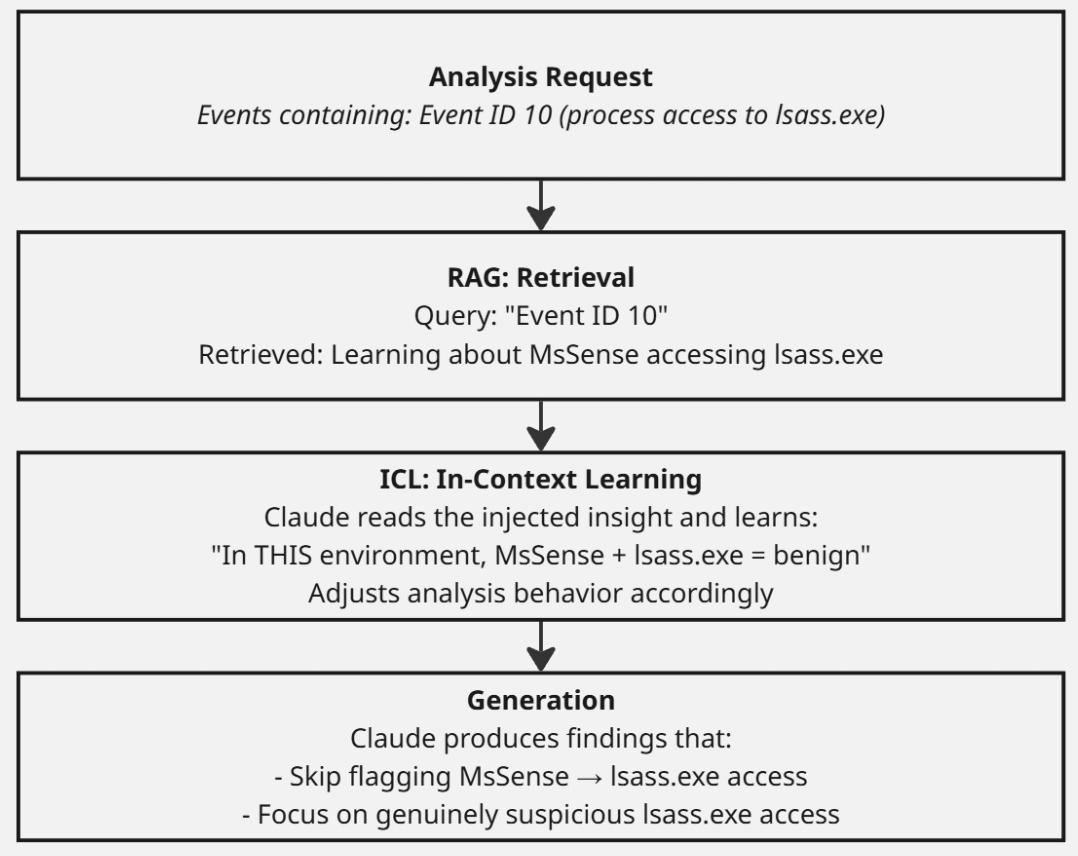
RAG is a data retrieval process that retrieves relevant information from a knowledge base and injects that information into a LLM’s prompt before generation. This helps the LLM to analyze/look at data with better context so that it can be more accurate. RAG, as the name suggests, can be broken down into 3 pieces — Retrieval, Augmentation, and Generation and the following characteristics from this project can fit via:
Retrieval: Extracts relevant events. First via Event ID (main) and then a vector similarity search (fallback)
**Augmentation: **Injects learnings into system prompt
Generation: Claude analyzes events with augmented context
ICL is the ability for an LLM to learn patterns based on examples or instructions provided in a prompt without leveraging fine-tuning. As more learnings accumulate in the knowledge base, RAG retrieves the most relevant ones and injects them into the context window for each analysis. RAG and ICL work hand in hand: RAG retrieves and injects the learnings, while ICL is the LLM’s ability to understand and apply that injected context during generation. Here is a visual representation of these two working together in this project:
For learnings to be applied, they must first be created. Learnings are stored in learnings.db in the learnings table, and are created by adding feedback after an analysis. For example, I analyzed some .NET ETW data and the report flagged:
PowerShell Initiated .NET ETW Tracing: PowerShell process spawned logman.exe
to create a .NET runtime ETW trace named 'DotNet'...
I didn’t want this to continue being flagged, so I marked it as benign with this feedback:
logman.exe shouldn't be triggered on. It is a monitoring tool.Claude transformed my feedback into a reusable insight:
PowerShell spawning logman.exe to create ETW traces is legitimate system
administration and monitoring activity. Logman.exe is a built-in Windows
performance monitoring tool and should not be flagged as suspicious...
When passing in this feedback I wanted the learnings to apply to certain events. This is done by generating the EventID that this behavior came from, as well as keywords to help the retrieval of this learning in the future:
**- Event ID: 1, 4688 (Process Creation) **— This enables a O(1) lookup. This lookup is incredibly fast and accurate.
- Keywords: logman.exe, powershell, etw, tracing, monitoring. — This enables semantic search which is the fallback. But I didn’t want learnings with no event id to get completely forgotten/not applied.
In future analyses, when EventSight encounters Event ID 1 involving logman.exe, this learning is automatically retrieved and injected into Claude’s context, preventing the same false positive.
One thing I had to be mindful of was making learnings too specific. If I created a learning like “The dllhost.exe process is a common process on Windows and is benign,” the system might blindly suppress a future alert where dllhost.exe is genuinely part of an attack chain. This could go the opposite way as well where I could create a learning that says — “WMI execution is malicious”, this would cause the system to constantly flag WMI execution even if it was administrative activity. The learnings needed to capture the right level of generality — specific enough to reduce false positives, but not so narrow that they create blind spots.
After I applied this I realized that I was going through a very manual process of:
- Pull EVTX (either from an automated attack or legit behavior)
- Run analysis
- Apply Learning
- Re-Run Analysis
This worked for a while and was doing fine. However — it was very manual and tedious. I was talking to Max (again) and he suggested that I:
- Create a MCP server version of this tool and add it to claude code. This way I could interact with it a bit easier, as well as have an easier process of adding learnings instead of the specific command-line parameters. Just let the MCP server tool deal with that.
- Implement Agentic RAG. To do this I needed to store my events in a database, which were previously stored in memory and discarded. This allowed me to do lookups on this data to apply learnings from past analysis or have the system find activity it didn’t previously identify.
Agentic RAG is the ability to create an autonomous agent loop. This means that when I want to add feedback I can do so by having the system iterate on itself if it didn’t find something. I can say something like — you didn’t see psexecsvc service being created, find it.
Honestly, this made my interaction with learnings 10x more pleasant. I didn’t have to do a manual analysis or deal with exact syntax when inputting the feedback. I could say “query all 4688 events in the database and find logman.exe activity; add a learning that all of these are benign.” It also allowed me to do really cool things like pass in my MSRPC-to-ATTACK project and have it apply learnings on RPC events:
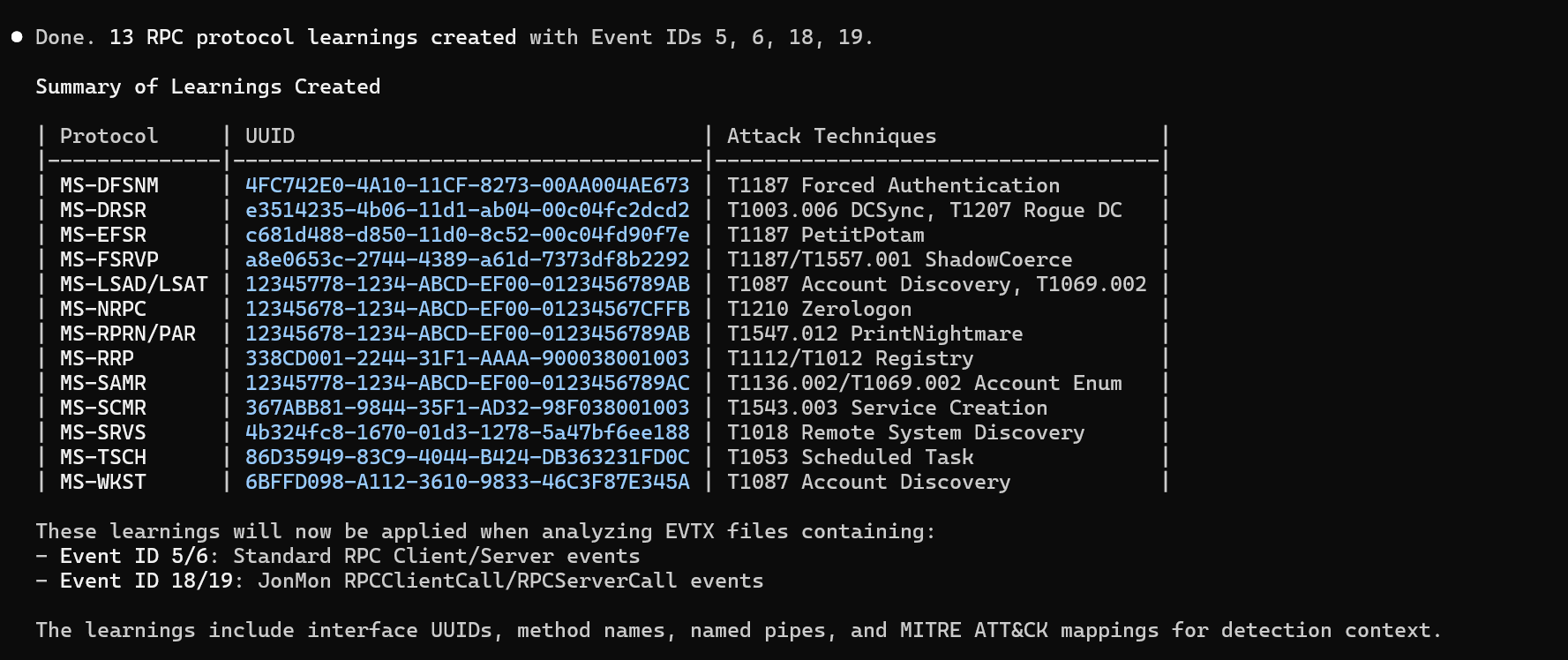
I probably went from 20 learnings to 49 in an hour period using the MCP server to help with the learnings. This also made the use of correlations easier to use as well.
Correlations
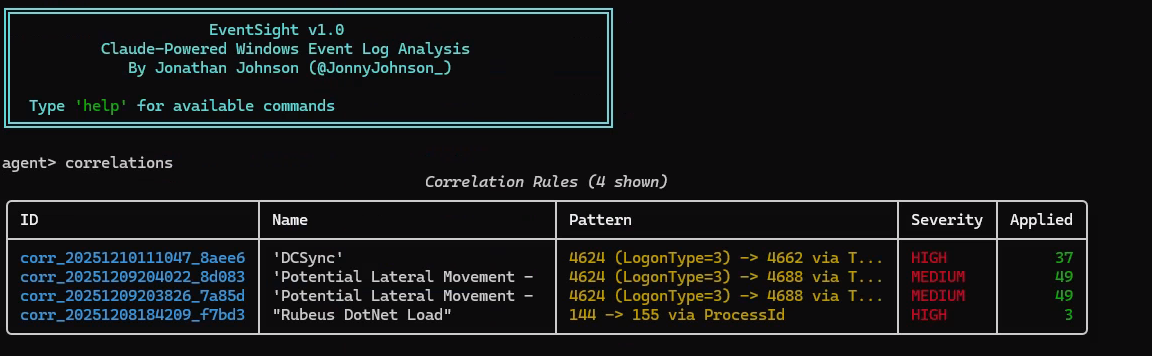
In my opinion — one of the greatest skills a defender knows is how to bring 2 or more events together to show a bigger story. This is a necessity in the defensive space. I wanted to apply this within this system as well, so that it knew if it saw 2 events with certain attributes — to join them for analysis. Just like learnings, correlations leverage RAG + ICL to be successful. Correlations are stored within the learning.db in the correlation_rules table. These correlation rules can look like this:
| Field | Value |
| - - - - - - - - - | - - - - - - - - - - - - - - - - -|
| ID | corr_20251210111047_8aee6622 |
| Name | DCSync |
| Source Event ID | 4624 (Logon) |
| Target Event ID | 4662 (Directory Service Access) |
| Source Field | TargetLogonId |
| Target Field | SubjectLogonId |
| Security Context | DCSync |
This rule correlates a logon event (4624) with a directory service access event (4662) by matching the logon session IDs. This pattern detects potential DCSync attacks where an attacker uses directory replication privileges to extract password hashes from a domain controller.
These correlations are extremely powerful in telling Claude — hey this is something to look out for, if you see it I want to know about it.
Practical Examples
Now that we have dove into the various components of EventSight, I want to show some examples of using EventSight when doing analysis on real-time events versus pulled events. There are benefits and trade-offs for both avenues, it really depends on your use case and function.
Static Events
Static analysis was the original proof of this tool and I think it holds a ton of value. In the section below, I talk about leveraging this for continuous monitoring but the static analysis can be more powerful depending on someones’ function or use case.
Threat Hunters / Incident Responders — if someone is doing threat hunting or IR work on events that have already happened or larger EVTX files, static analysis is going to work well. You can perform a deeper analysis of the EVTX by passing in different EventIDs then you did previously. All of those findings and learning can be applied and fed into the continuous monitoring.
Researchers — If you are someone that likes to look at events and wants to see the value of an event source during an attack, then leveraging this tool to use no filtering at all would be a great start. Or event passing in the EventID you think would be useful and getting additional context on them.
I did and leveraged the static analysis all the time. I am always curious — could I have missed something? This isn’t uncommon — we are human and we fixate on certain activities which can hinder our ability to perform a better analysis across the whole dataset. I was very impressed with the analysis of various EVTX files. Performing the static analysis really helped enhance the continuous monitoring by upgrading the learnings/correlations applied.
Leveraging EventSight MCP server, here are some examples of benign and malicious activity:
WMI Legitimate Administrator Scripting:
> Analyze the evtx files in C:\Users\TestUser\Documents\TestEvents\WMI\AdminWMI\ and use
events.csv to filter events.
Analysis Summary
Files Analyzed
| File | Total Events | Filtered Events | Findings |
| - - - - - - - -| - - - - - - - | - - - - - - - - -| - - - - - - - -|
| WMI.evtx | 6 | 6 | 0 |
| Security.evtx | 2,565 | 3 | 2 (Info only) |
 - -
Results: ✅ No Threats Detected
WMI.evtx
Summary: Standard Windows providers loading for routine administrative tasks - no threats.
WMI Lateral Movement:
> Analyze the evtx files in C:\Users\TestUser\Documents\TestEvents\LateralMovement\WMI
and use events.csv to filter events.
Files Analyzed
| File | Total Events | Filtered Events | Findings |
| - - - - - - - -| - - - - - - - | - - - - - - - - -| - - - - - - - - - - - - - - - - |
| JonMon.evtx | 713 | 193 | 10 (1 Critical, 1 Low, 8 Info) |
| Security.evtx | 325 | 27 | 3 (1 High, 1 Medium, 1 Info) |
 - -

🔴 CRITICAL FINDING
Malicious WMI Event Subscription with ActiveScriptEventConsumer
| Field | Value |
| - - - - - - - - - -| - - - - - - - - - - - - - - - - - - |
| Severity | CRITICAL (95% confidence) |
| Technique | T1546.003 (WMI Event Subscription) |
| Tactic | Persistence |
| Subscription Name | Test_7835_Filter |
Description: A malicious WMI permanent event subscription was created with an ActiveScriptEventConsumer monitoring for notepad.exe process creation.
WQL Query:
SELECT * FROM __InstanceCreationEvent WITHIN 5
WHERE TargetInstance ISA 'Win32_Process'
AND TargetInstance.Name = 'notepad.exe'
This matches the test script you ran earlier - EventSight successfully detected the persistence mechanism.
 - -

🔴 HIGH SEVERITY FINDING
WMI Remote Code Execution - Lateral Movement
| Field | Value |
| - - - - - -| - - - - - - - - - - - - - - - -|
| Severity | HIGH (85% confidence) |
| Technique | T1047 (WMI) |
| Tactic | Lateral Movement |
| User | MARVEL.LOCAL\thor |
| Source | WAKANDA-WRKSTN (172.22.75.63) |
| Process | powershell.exe (PID 3876) |
| Parent | WmiPrvSE.exe |
Description: Network logon from WAKANDA-WRKSTN followed immediately by WmiPrvSE.exe spawning PowerShell - classic WMI lateral movement pattern.
 - -

🟡 MEDIUM SEVERITY FINDING
Multiple Remote Network Logons from Same Source
| Field | Value |
| - - - - - -| - - - - - - - - - - - - - - - -|
| Severity | MEDIUM (60% confidence) |
| Technique | T1078 (Valid Accounts) |
| Tactic | Initial Access |
| Source | WAKANDA-WRKSTN (172.22.75.63) |
Description: Multiple network logons (Type 3) with both NTLM and Kerberos authentication from the same source within seconds.
Attack Chain Detected

WAKANDA-WRKSTN (172.22.75.63)
│
│ 1. Network Logon (Kerberos/NTLM)
▼
VICTIM SYSTEM (172.22.78.183)
│
│ 2. WMI Remote Execution
▼
WmiPrvSE.exe
│
│ 3. Spawns PowerShell (encoded download cradle)
▼
powershell.exe
│
│ 4. Creates WMI Persistence
▼
Test_7835_Filter (ActiveScriptEventConsumer)
│
│ 5. Triggers on notepad.exe
▼
[PAYLOAD EXECUTION]
As you can see — the system is doing a great job at leveraging learnings to identify true malicious behavior.
Leveraging EventSight here are some more examples:
DCSync + Kerberoasting:
> evaluate C:\Users\TestUser\Documents\TestEvents\Kerberoast-DCSync\Security.evtx - filter-file events.csv
EventSight SECURITY ANALYSIS
File Security.evtx
Analyzed 2025-12-15 19:23:48
Events 79 of 117,818 total
Findings Overview
2 HIGH
Detected 2 high severity finding(s).
Activity Summary:

[H] Potential Kerberoasting Attack - Rapid Service Ticket Requests (T1558.003)
→ User: MARVEL.LOCAL\thor | Source: 172.22.86.79
[H] Potential DCSync Attack - Directory Service Access (T1003.006) [Matched: DCSync]
→ User: MARVEL\thor | Source: 172.22.86.79

Detailed Findings
HIGH Potential DCSync Attack - Directory Service Access 2025-12-10 16:01:03
ID: finding_20251215192331_b0_1 | T1003.006 | credential-access | Confidence: 89%
User thor performed DS object access (Event 4662) with replication rights
(%%7688) including access to {1131f6ad-9c07-11d1-f79f-00c04fc2dcd2} which indicates
DCSync capabilities. This was preceded by network logon from 172.22.86.79, suggesting
potential lateral movement followed by domain controller replication abuse.
Event IDs: 4624 4662
> Immediately investigate user thor's privileges and recent activities. Check if
this user should have replication rights. Review all network connections from
172.22.86.79 and validate the legitimacy of directory replication operations.
Consider resetting thor's credentials if unauthorized.
Context:
User: MARVEL\thor
Source IP: 172.22.86.79
Matched Correlation Rules:
DCSync: Event 4624 → 4662 via = '0xef253'
────────────────────────────────────────────────────────────────────

HIGH Potential Kerberoasting Attack - Rapid Service Ticket Requests 2025-12-10
15:58:07
ID: finding_20251215192331_b0_0 | T1558.003 | credential-access | Confidence: 87%
User thor@MARVEL.LOCAL requested service tickets for multiple user accounts (thor
and ironman) within seconds at 15:58:07. This pattern of rapid TGS-REQ requests
targeting user accounts with SPNs is consistent with Kerberoasting attacks where
attackers harvest service tickets for offline password cracking.
Event IDs: 4769
> Investigate the source host 172.22.86.79 and user thor for unauthorized service
ticket enumeration. Check if these accounts have SPNs and monitor for additional TGS
requests. Review authentication logs for this user and validate legitimate need for
accessing these service accounts.
Context:
User: MARVEL.LOCAL\thor
Source IP: 172.22.86.79
Remote Akira Ransomware:
> evaluate C:\Users\TestUser\Documents\TestEvents\Ransomware\Security.evtx - filter-file events.csv
EventSight SECURITY ANALYSIS
File Security.evtx
Analyzed 2025-12-15 17:42:28
Events 304 of 313 total
Findings Overview
3 CRITICAL 2 HIGH
Detected 3 critical, 2 high severity finding(s).
Activity Summary:

[H] Lateral Movement via Administrative Share Access (T1021.002)
→ User: MARVEL\thor | Source: 172.22.86.78
[C] Akira Ransomware Activity - Systematic File System Traversal and Ransom Note Deployment (T1486)
→ User: MARVEL\thor | Source: 172.22.86.78
[H] Lateral Movement via Network Logon - Ransomware Propagation (T1021)
→ User: MARVEL\thor | Source: ASGARD-WRKSTN (172.22.86.78)
[C] Akira Ransomware Deployment via Network Share (T1486)
→ User: MARVEL\thor | Source: 172.22.86.78
[C] Akira Ransomware Activity - Mass File Encryption and Ransom Note Deployment (T1486)
→ User: MARVEL\thor | Source: 172.22.86.78

Detailed Findings
CRITICAL Akira Ransomware Activity - Systematic File System Traversal and Ransom Note Deployment (2 occurrences) 2025-12-10 14:07:52
ID: finding_20251215174035_b0_0 | T1486 | Impact | Confidence: 95%
Multiple 'akira_readme.txt' files being accessed across various directories (TestFolder, Users\captain\Desktop, Documents, AppData,
etc.) indicates active Akira ransomware deployment. The systematic traversal of user directories combined with ransom note placement is
characteristic of ransomware encryption and extortion activities.
Event IDs: 5145
> Immediately isolate affected systems, initiate incident response procedures, check for encrypted files, and assess backup integrity.
Investigate the initial infection vector and scope of compromise.
Context:
User: MARVEL\thor
Logon Type: 3 (Network)
Source IP: 172.22.86.78
File: akira_readme.txt
Occurrences (2 total):
1. [2025-12-10 14:07:52] akira_readme.txt | MARVEL\thor | from 172.22.86.78
2. [2025-12-15 17:42:18] akira_readme.txt | unknown | MARVEL\thor | from 172.22.86.78
────────────────────────────────────────────────────────────────────

CRITICAL Akira Ransomware Deployment via Network Share
ID: finding_20251215174100_b1_0 | T1486 | Impact | Confidence: 95%
User 'thor' from IP 172.22.86.78 is systematically accessing and creating 'akira_readme.txt' files across multiple directories on the
target system via C$ administrative share. This pattern is consistent with Akira ransomware deployment, where ransom notes are dropped in
various user directories after file encryption. The widespread placement of ransom notes across Documents, Downloads, AppData, and other
user folders indicates active ransomware execution.
> IMMEDIATE ACTION REQUIRED: Isolate both source (thor/172.22.86.78) and target systems from network. Check for file encryption
indicators. Verify backup integrity before restoration. Investigate how 'thor' account was compromised and obtained administrative access.
Context:
User: MARVEL\thor
Source IP: 172.22.86.78
File: akira_readme.txt
────────────────────────────────────────────────────────────────────

CRITICAL Akira Ransomware Activity - Mass File Encryption and Ransom Note Deployment (3 occurrences)
ID: finding_20251215174117_b2_0 | T1486 | Impact | Confidence: 95%
User 'thor' from IP 172.22.86.78 is accessing multiple encrypted files with .arika extensions and deploying akira_readme.txt ransom
notes across user directories. This matches the known Akira ransomware signature with characteristic .arika file extension and ransom note
filename pattern. The activity shows systematic traversal of user directories including Music, Documents, AppData, and deployment of
ransom notes in each location.
> Immediately isolate affected systems, activate incident response procedures for ransomware, and investigate the extent of
encryption. Block network access from source IP 172.22.86.78 and check for lateral movement indicators.
Context:
User: MARVEL\thor
Source IP: 172.22.86.78
File: akira_readme.txt, *.arika files
Occurrences (3 total):
1. [2025-12-15 17:41:17] akira_readme.txt, *.arika files | MARVEL\thor | from 172.22.86.78
2. [2025-12-15 17:41:39] akira_readme.txt | MARVEL\thor | from 172.22.86.78
3. [2025-12-15 17:42:02] akira_readme.txt | MARVEL\thor | from 172.22.86.78
────────────────────────────────────────────────────────────────────

HIGH Lateral Movement via Network Logon - Ransomware Propagation 2025-12-10 14:08:50
ID: finding_20251215174035_b0_1 | T1021 | Lateral Movement | Confidence: 90%
Network logon (Type 3) from remote IP 172.22.86.78 followed by extensive file system access patterns typical of ransomware deployment.
The user 'thor' authenticating from ASGARD-WRKSTN and then accessing sensitive directories and ransom notes indicates lateral movement for
ransomware distribution.
Event IDs: 4624 5145
> Investigate the source system ASGARD-WRKSTN for initial compromise indicators. Block network communications between affected systems
and monitor for additional lateral movement attempts.
Context:
User: MARVEL\thor
Logon Type: 3 (Network)
Source IP: 172.22.86.78
────────────────────────────────────────────────────────────────────

HIGH Lateral Movement via Administrative Share Access (4 occurrences) 2025-12-10 14:07:52
ID: finding_20251215174139_b3_1 | T1021.002 | Lateral Movement | Confidence: 90%
User 'thor' from IP 172.22.86.78 is accessing the C$ administrative share to write ransom notes across multiple user directories. This
indicates lateral movement and privilege escalation, as accessing C$ shares typically requires administrative privileges. The systematic
directory traversal pattern suggests automated ransomware deployment.
Event IDs: 5145
> Investigate source system at 172.22.86.78, check how user 'thor' obtained administrative privileges, review authentication logs, and
assess scope of network compromise
Context:
User: MARVEL\thor
Source IP: 172.22.86.78
Occurrences (4 total):
1. [2025-12-10 14:07:52] MARVEL\thor | from 172.22.86.78
2. [2025-12-15 17:41:00] MARVEL\thor | from 172.22.86.78
3. [2025-12-15 17:41:39] MARVEL\thor | from 172.22.86.78
4. [2025-12-15 17:42:02] MARVEL\thor | from 172.22.86.78
As you can see, the static analysis does an amazing job at identifying important information from the evtx file(s). Like I mentioned earlier, this is especially helpful for threat hunters and researchers. Instead of manually parsing these files and running custom rules through them and then seeing if you missed anything — this helps with all of that. One thing I implemented as well is the ability to print out a report either as a HTML or Markdown file. These provide the findings in a clean and easy way to read:
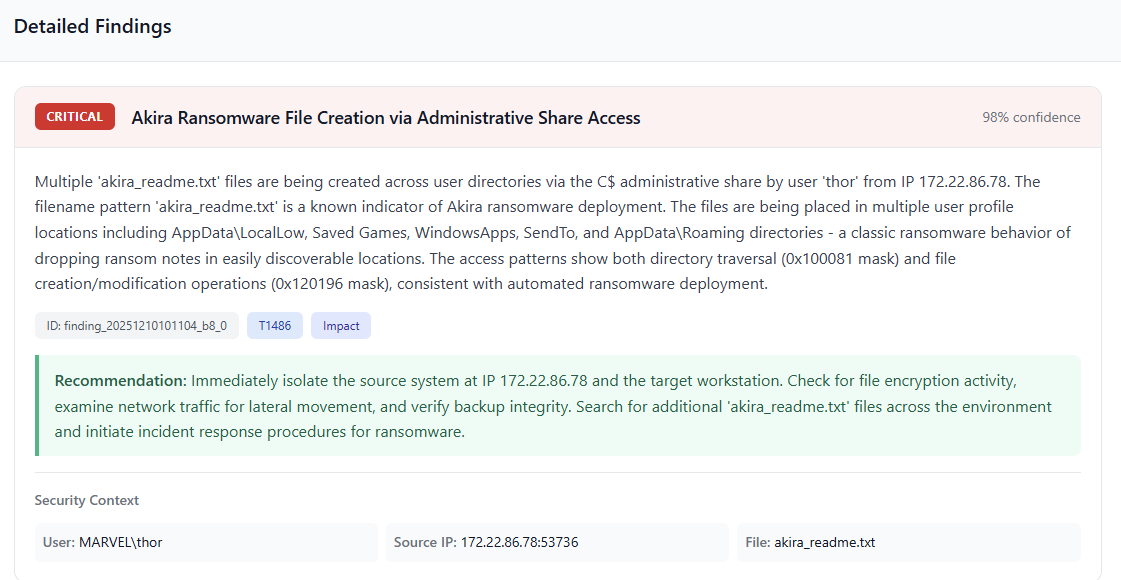
You can find examples like these in the **ReportExamples **in the EventSight project folder.
Continuous Monitoring
One of the things I wanted to do with this project was have it analyze events in real-time and return to me any findings. The way I thought about this — my own AI Detection Engineering and SOC team that was built on my experience. By default, a report will be created called eventsight_report.html. This can be opened in a browser, and it updates every 30 seconds with new findings. Let’s look at some examples!
Security Events
Attack Context: PsExec Lateral Movement
evaluate C:\Windows\System32\Winevt\Logs\Security.evtx - filter-file events.csv - continuous
┌────────────────────────────────────────────────────────────────
│ 🔍 CONTINUOUS ANALYSIS STARTED
├────────────────────────────────────────────────────────────────
│ 📁 File: C:\Windows\System32\Winevt\Logs\Security.evtx
│ 🎯 Filter: 31 Event IDs
│ ⏱️ Interval: 60s | Batch size: 50
│ 🧠 Learnings loaded: 56
│ 🔗 Correlation rules: 4
│ 📌 Mode: Watching for new events only (skipping historical)
│ 📄 Report: C:\Users\thor\Desktop\Eventsight\eventsight_report.html
└────────────────────────────────────────────────────────────────
📄 HTML report initialized: C:\Users\thor\Desktop\Eventsight\eventsight_report.html
[16:25:42] 🔴 CRITICAL: Remote Service Installation and Execution with Suspicious Rundll32 (92%)
[16:25:42] 🟠 HIGH: Suspicious Remote Service Creation with Random Filename (85%)
📄 Report updated (2 total findings)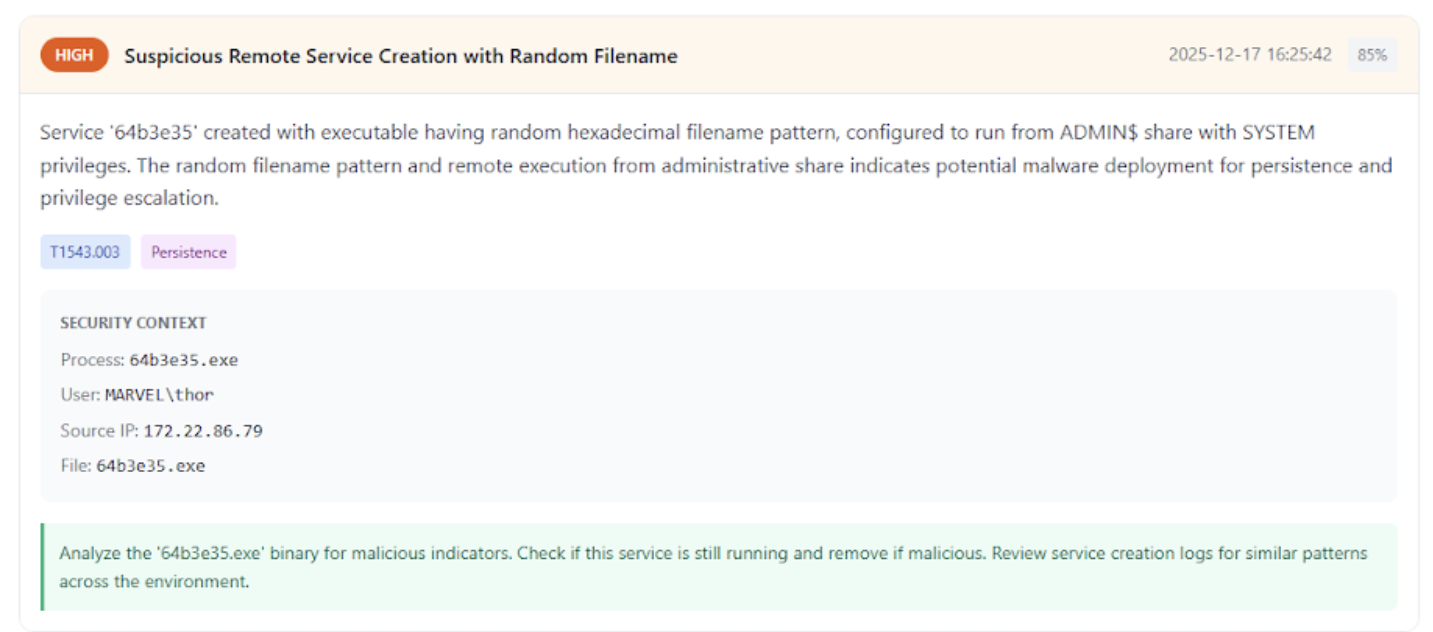
JonMon
Attack Context: PsExec Lateral Movement, Process Injection, and DCSync
evaluate C:\Windows\System32\winevt\Logs\JonMon%4Operational.evtx - continuous - filter-file events.csv
┌────────────────────────────────────────────────────────────────
│ 🔍 CONTINUOUS ANALYSIS STARTED
├────────────────────────────────────────────────────────────────
│ 📁 File: C:\Windows\System32\winevt\Logs\JonMon%4Operational.evtx
│ 🎯 Filter: 31 Event IDs
│ ⏱️ Interval: 60s | Batch size: 50
│ 🧠 Learnings loaded: 56
│ 🔗 Correlation rules: 4
│ 📌 Mode: Watching for new events only (skipping historical)
│ 📄 Report: C:\Users\thor\Desktop\Eventsight\eventsight_report.html
└────────────────────────────────────────────────────────────────
📄 HTML report initialized: C:\Users\thor\Desktop\Eventsight\eventsight_report.html
[16:31:27] ⏳ No new events, waiting...
[16:32:29] 🔄 Analyzing 123 new events...
[16:33:02] 🔴 CRITICAL: Remote Service Installation and Cobalt Strike Beacon Deployment (95%)
[16:33:02] 🟠 HIGH: Rundll32 Network Communication - Potential C2 Beaconing (88%)
[16:33:02] 🟡 MEDIUM: Multiple System Process Network Activity - Potential Lateral Movement Infrastructure (65%)
📄 Report updated (3 total findings)
[16:33:22] 🔴 CRITICAL: Cobalt Strike C2 Communication via Rundll32 with Mojo Named Pipe (95%)
[16:33:22] 🟠 HIGH: PowerShell Process Injection via Mojo Named Pipe (90%)
📄 Report updated (5 total findings)
[16:34:24] 🔄 Analyzing 187 new events...
[16:34:38] 🔴 CRITICAL: Rundll32 Network Communication Without Command Line Arguments (95%)
📄 Report updated (6 total findings)
[16:35:10] 🔴 CRITICAL: Rundll32.exe Process Injection and Network Communication (92%)
[16:35:10] 🔴 CRITICAL: Rubeus Kerberos Attack Tool Execution in PowerShell (95%)
[16:35:10] 🟠 HIGH: Suspicious Named Pipe Access - 'totesLegit' (88%)
[16:35:10] 🟡 MEDIUM: PowerShell Network Communication During Attack Tool Execution (78%)
📄 Report updated (10 total findings)
[16:35:39] 🔴 CRITICAL: Rundll32 Network Communication Without Command-Line Arguments (92%)
[16:35:39] 🟠 HIGH: PowerShell Spawning DllHost for Lateral Movement (88%)
[16:35:39] 🟠 HIGH: Suspicious LSARPC Named Pipe Access from DllHost (85%)
📄 Report updated (13 total findings)
[16:36:01] 🔴 CRITICAL: DCSync Attack - Directory Replication Service Abuse (95%)
[16:36:01] 🟠 HIGH: Suspicious Rundll32 Network Communication (85%)
📄 Report updated (15 total findings)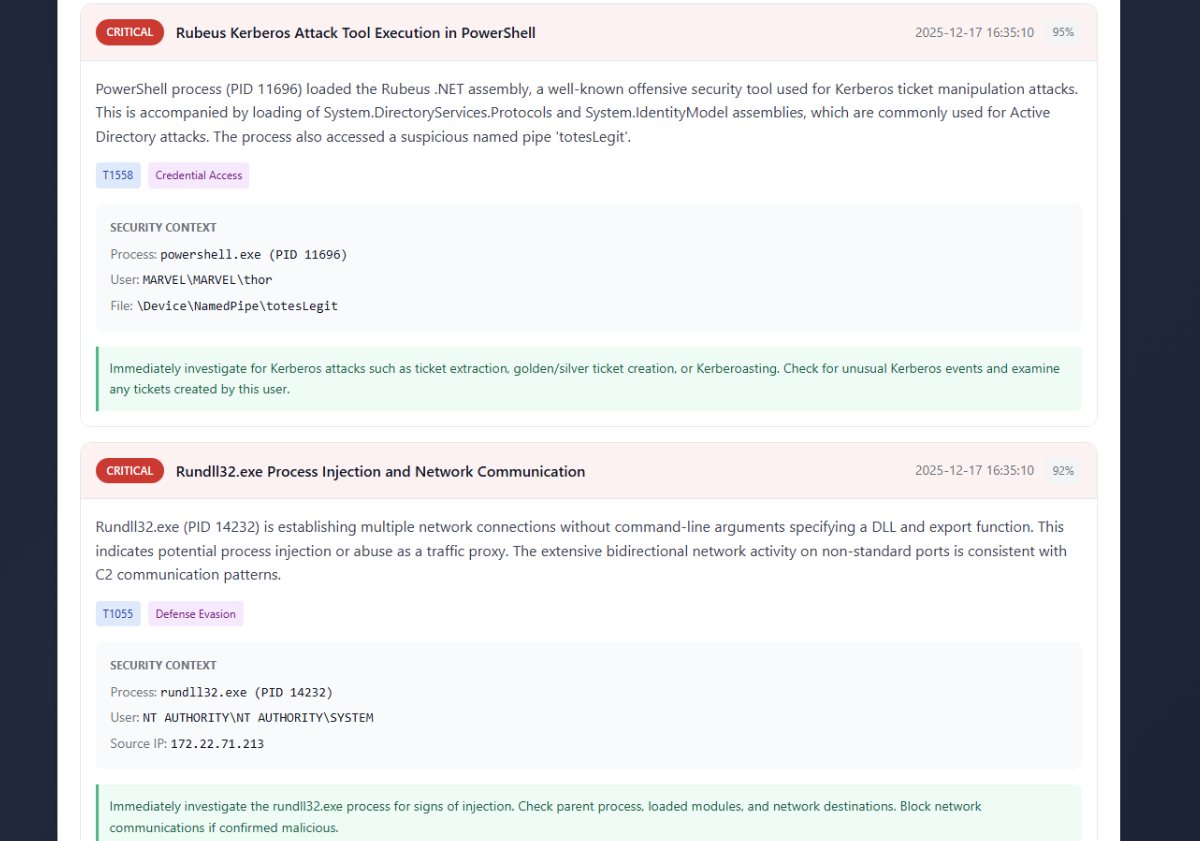
You can find this report within the ReportExamples as — BlogReportExample.html.
As you can see, continuous monitoring is incredibly useful. Being able to see lateral movement, injection, and DCSync from the client-side RPC data is honestly amazing. The system does a great job applying the learnings we had in the static analysis for real-time detection and analysis. This is incredibly powerful, and I could foresee companies moving this route to help augment or elevate their detection/soc teams. I do think it is important that there is a human element to have the final say of classification. Continuous monitoring currently only supports analysis of one event source. One could update this to leverage multithreading so that this isn’t a limitation. I have been thinking about updating the project to support that!
Conclusion
I was very hesitant about AI. Not because I thought it wasn’t useful, but because I have seen the industry heavily lean on it — even in situations I don’t think AI needs to be applied. However, I recognize that AI has a place and it can be used in situations like this — to analyze security events. The ability to teach the model over time is honestly next level. This was identifying activity in 2 days that I had a hard time identifying in my first year in the industry as a detection engineer. Understanding these concepts have made me excited to apply them in other areas of my Windows research as well.
I know a lot of these concepts (if not all) are not new to a lot of people, but I hope you enjoyed this blog! If you want to play with EventSight, you can find it on GitHub. I didn’t publish all the findings as GitHub was being weird since the file has gotten quite big. But add your own and play with it!
Lastly, I’d like to thank Max Harley again. As I mentioned earlier, he helped me with so many of these concepts and pushed me to explore this when I shared the idea with him. So, a huge thank you to him for that!