A First Look Inside the Windows Endpoint Security Platform
Introduction into the Windows Endpoint Security Platform
The CrowdStrike outage in July 2024 put a lot of attention around endpoint kernel development and raised the question from Microsoft if they still wanted to allow security vendors to develop kernel components. Microsoft announced the Windows Resiliency Initiative (WRI) in November 2024 and its focus was around giving security vendors more ways to build their products outside the kernel, while not removing capability.
In its June 2025 update, Microsoft said a private preview of the Windows endpoint security platform would go to a set of partners the following month. CrowdStrike was one of the companies working with Microsoft on it. Alex Ionescu later shared more of that work in his Fal.Con talk, including a working implementation using Windows Endpoint Security Platform (WESP).
We finally have our first public appearance of WESP in the latest Windows Insider Preview build 29661! There are two binaries that were shipped - espclient.dll (user-mode component) and wesp.sys (kernel driver). As far as I can tell, there is no public SDK yet which makes development difficult. However, there are symbols for these binaries which made reversing a bit easier. It’s nice to see this as it now gives the public peek behind the curtain around what Microsoft has been cooking for the past couple of years.
In this blog, I am going to go over my initial analysis of wesp.sys and espclient.dll, how some of the components work, and a POC I built to register a client and receive process-creation events. Again, there is no public SDK and these components will change over time, so I wouldn’t use this as the final “how WESP works” guide, but more of my initial analysis.
Note: To make the code flow for WESP easier to read I trimmed down the code snippets, which means that they are not one-to-one with what is in the binaries and leave out some detail.
WESP Architecture: Kernel and User-Mode Components
At a high level, WESP uses a consumer/producer architecture built around a Microsoft-owned driver/minifilter (wesp.sys) and a user-mode client library (espclient.dll). Security vendors register a WESP consumer, create an event queue, and install rules whose actions point to that queue. Matching events are delivered to callbacks in their normal user-mode process.
The kernel mode driver (wesp.sys) still must register callbacks for event collection and safely package the data, but the vendor parsing, detection, and response logic can live in a normal process. That puts more of the driver development responsibility on Microsoft instead of a whole bunch of third parties with varying levels of kernel experience. A crash in the user-mode consumer does not, by itself, bring down the box which was the ultimate goal of this project.
One thing you’ll notice right off the bat in either binary is the Esp prefix used by WESP APIs:
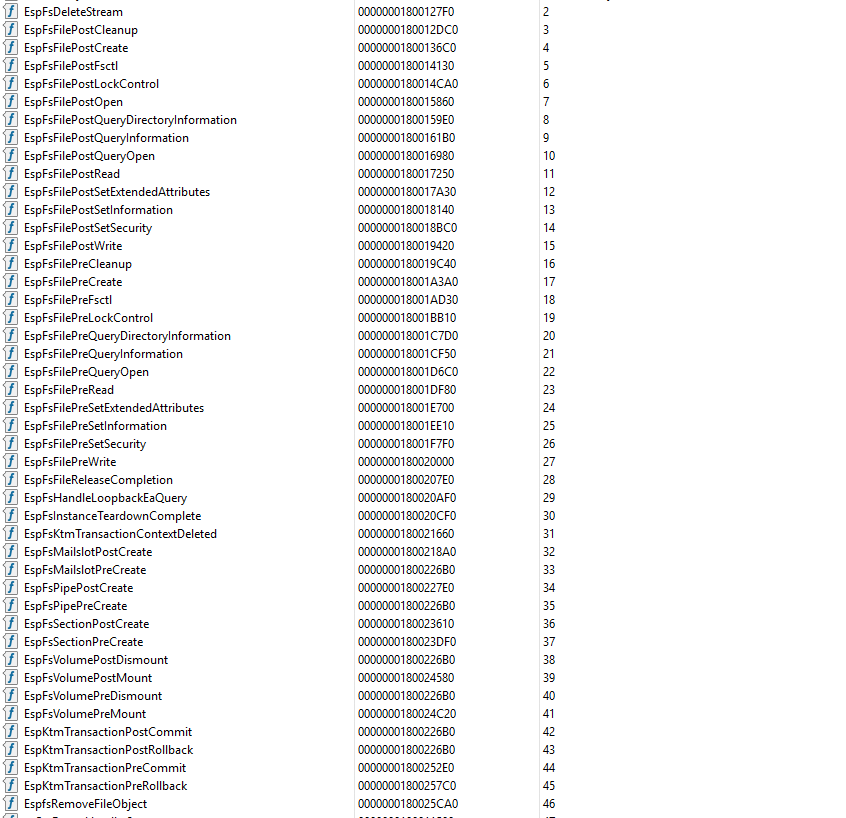
The client binary, espclient.dll, already has a lot of exported APIs. Even without the SDK, symbols allowed me to understand these functions enough to where I was able to get a minimal POC working with the help of my AI friend, which I will show later in this blog!
How Consumer & Producer Communication Works
The first thing I wanted to figure out was how espclient.dll (consumer) communicates with wesp.sys (producer). When digging into the different communication options in wesp.sys, I came across the FltCreateCommunicationPort API which led me to identify that there was a filter communication port called EspFilterPort. This wasn’t too surprising since filter communication ports have been used for a long time for user-mode and kernel communications. Diving into the code flow it was clear that this was the port used and it allows up to 512 connections:
UNICODE_STRING portName = RTL_CONSTANT_STRING(L"\\EspFilterPort");

FltBuildDefaultSecurityDescriptor(
    &securityDescriptor,
    FLT_PORT_ALL_ACCESS);

InitializeObjectAttributes(
    &objectAttributes,
    &portName,
    OBJ_CASE_INSENSITIVE | OBJ_KERNEL_HANDLE,
    nullptr,
    securityDescriptor);

status = FltCreateCommunicationPort(
    Filter,
    &ServerPort,
    &objectAttributes,
    ServerContext,
    fltmgr::connect_callback,
    fltmgr::disconnect_callback,
    fltmgr::message_notify_callback,
    512);
FltCreateCommunicationPort registers callbacks for new connections, disconnections, and messages from user mode. Every connection attempt starts in fltmgr::connect_callback. Once connected, user-mode requests sent with FilterSendMessage enter message_notify_callback.
Who is allowed to connect?
\EspFilterPort is protected by its ACL. Once a caller reaches wesp::server::connect, WESP applies additional checks based on the machine’s test-signing state and the caller’s WESP://Permission value. The function reads the calling process’s primary token and searches its security attributes for WESP://Permission.
When the WESP://Permission check happens, it is not treated as a simple boolean indicating whether the attribute exists. WESP looks for one of two unsigned 64-bit values, shown here in decimal: 10000000 or 1000000000. The value determines what additional requirements apply before the client is allowed to connect to the communication port.
With test signing disabled, the two paths are:
10000000does not require the calling process to be an Antimalware PPL.1000000000requires the calling process to be an Antimalware PPL.
This makes WESP://Permission behave more like a permission class than a simple yes-or-no authorization flag. For the second value, WESP queries ProcessProtectionInformation and verifies that the caller is running as an Antimalware PPL (protection level 0x31). This wasn’t surprising to see, as so many security vendor capabilities are gated around PPL in Windows.
One useful detail for researchers is that I was able to connect from an elevated test process with test signing enabled on this preview build without having either the WESP://Permission token attribute or Antimalware PPL protection. The port’s access control still applies: the default security descriptor created earlier restricts access to administrators and SYSTEM. That gave me a way to test the APIs from a normal elevated process. This is by design and I can only assume Microsoft did this so that developers could interact with WESP more easily instead of worrying about obtaining the security permissions.
After the caller passes these checks, server::connect reads the context created by espclient.dll. That context tells WESP whether this is a registration operation, an unregistration operation, a management connection, or an event-queue delivery connection. The function sets up that connection and returns the connection state used by the disconnect and message callbacks.
When do these checks happen?
From what I can tell, the access checks happen anytime a new connection is made to \EspFilterPort. This includes things like registering a client, unregistering a client, and enumerating registered or connected clients, since espclient.dll opens a short-lived connection for each of those operations.
EspConnectClient also triggers the check when it creates the longer-lived management connection. Once that connection is established, requests sent with FilterSendMessage reuse the same handle and do not query the token or process protection again. The driver instead checks whether the existing connection is allowed to perform the requested operation.
Receiving events follows the same idea but uses a separate connection created by EspConnectEventQueueWithCallback. That connection receives its own access check, then waits for events with FilterGetMessage. Receiving individual messages does not cause another connection or repeat the access check. If either persistent connection is closed and reopened, the checks run again.
How Events Move from Producer to Consumer
The point of WESP is to give security vendors endpoint detection and response (EDR) like visibility without requiring each vendor to ship another kernel driver. WESP collects events for processes, threads, image loads, files, registry keys, and handles, then sends the events that match a client’s rules back to user mode.
I am going to use process creation to walk through the flow. During initialization, WESP registers create_process_notify with PsSetCreateProcessNotifyRoutineEx2:
status = PsSetCreateProcessNotifyRoutineEx2(
    0,
    create_process_notify,
    FALSE);
The callback handles both process creation and termination. A non-null PS_CREATE_NOTIFY_INFO represents a new process, while a null value represents process termination. After collecting the available process metadata, it passes the event to the relevant rule-engine path:
if (CreateInfo != nullptr)
    RuleEngine::process_event<ProcessCreate>(..., &event);
else
    RuleEngine::process_event<ProcessTerminate>(..., &event);
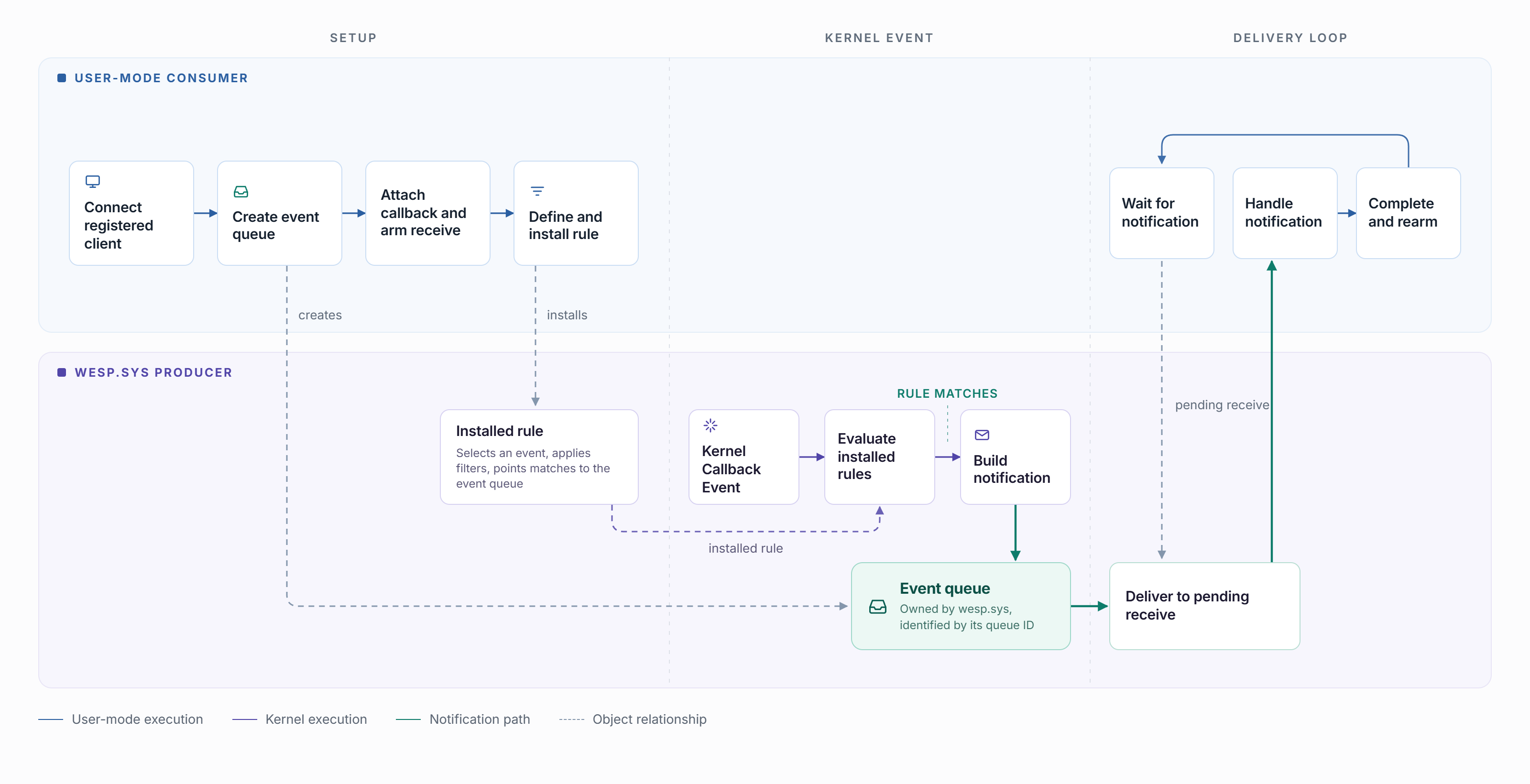
Before events can be delivered, the consumer creates an event queue with EspCreateEventQueue. The request enters wesp.sys through message_notify_callback, which calls ClientObject::create_event_queue to create the kernel queue. The consumer then calls EspConnectEventQueueWithCallback, using the client and queue GUIDs to connect its notification callback to the newly created queue. WESP creates the queue’s delivery worker with PsCreateSystemThread, which waits on a kernel synchronization object (KEVENT) using KeWaitForSingleObject when the queue is empty.
The consumer then allocates a notification object with EspAllocateEventNotification and arms it with EspArmEventNotification. Arming the notification posts an asynchronous FilterGetMessage, leaving the consumer waiting for WESP to deliver an event.
When a process is created, RuleEngine::process_event<ProcessCreate> evaluates the installed ProcessCreate rules. If a rule matches, WESP uses the queue referenced by that rule as the notification’s destination. WESP builds the notification and passes it to EventQueue::queue_async_notification_internal, which adds it to the queue and wakes the delivery worker by signaling the KEVENT.
Once awake, the delivery worker removes the notification from the queue and calls FltSendMessage, which delivers it through the consumer’s pending FilterGetMessage request. The notification is then passed to the consumer’s callback, where it is completed with EspCompleteEventNotification before the notification object is rearmed for the next event.
This is the full path at a high level:
Building a WESP Consumer POC
With the kernel path mapped out, I wanted to see if I could actually consume one of these events. There is no public WESP SDK, but espclient.dll exports enough of the client API to build a small proof of concept (POC).
I created a POC called WespConsumerPOC that can register a consumer, create a queue, create a process creation rule, and have enough output to prove the event made it back to user mode. I still don’t know the full ProcessCreate event structure, so not all of the event metadata is printed.
Everything in the POC goes through espclient.dll. The register, clients, and remove commands call EspRegisterClient, EspEnumerateRegisteredClients, and EspUnregisterClient. The monitor command uses the same DLL to create the queue, install the ProcessCreate rule, and receive events. The DLL takes care of the private protocol underneath it, including communication with \EspFilterPort.
.\wesp-consumer.exe register
.\wesp-consumer.exe clients
.\wesp-consumer.exe monitor "{CLIENT-GUID}" 60
.\wesp-consumer.exe remove "{CLIENT-GUID}"
Once the client is registered, monitor does the following:
EspConnectClientconnects to an existing registered client.EspCreateEventQueuecreates the queue that will receive events.EspConnectEventQueueWithCallbackattaches the user-mode callback to that queue.EspAllocateEventNotificationandEspArmEventNotificationpost the initial receive.EspCreateRulecreates a local ProcessCreate rule object whose action points to the queue.EspUpdateRulesinstalls the rule for the connected client.- When a process creation event matches the rule, WESP adds the notification to the target queue. The queue’s delivery worker calls FltSendMessage to send the notification to the consumer.
- The user-mode consumer receives the packaged notification through its pending
FilterGetMessagerequest. espclient.dll invokes the consumer’s callback, which completes the notification withEspCompleteEventNotificationand rearms the receive for the next event.
The queue-before-rule ordering is what initially tripped me up. The rule does not contain the callback, it describes the event I care about and points its action to a queue. The callback belongs to the queue’s delivery connection, so I arm the receive before installing the rule. That way the consumer is already waiting when events begin to match.
After some testing and some help from an AI friend, this is the output of the POC:
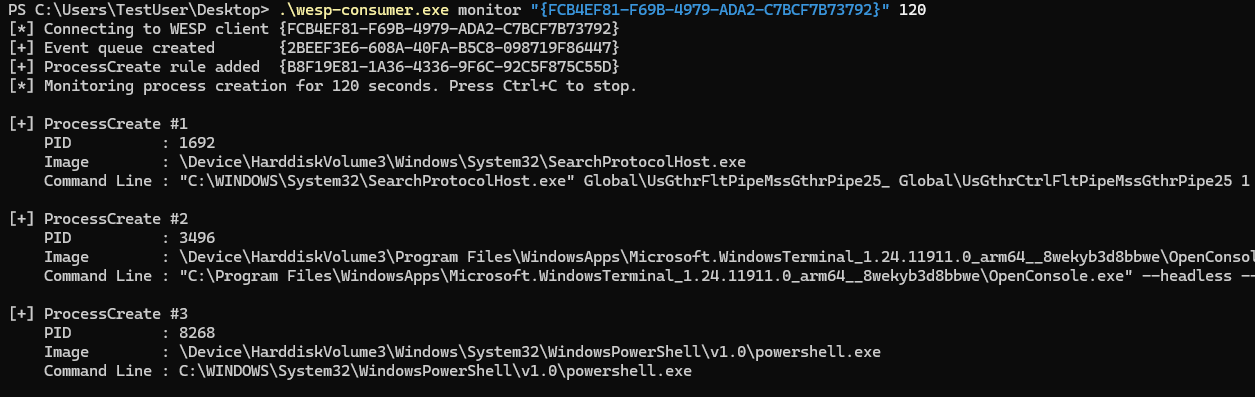
Woo! Events! This was exciting to get working. The client and its persisted WESP objects can also be removed with:
.\wesp-consumer.exe remove "{FCB4EF81-F69B-4979-ADA2-C7BCF7B73792}"Registering a client creates an entry under HKEY_LOCAL_MACHINE\SYSTEM\CurrentControlSet\Services\wesp\PersistedStore\Clients\<client-guid>. I tried opening it from a SYSTEM prompt running as PPL (WinTcb), but still received access denied. 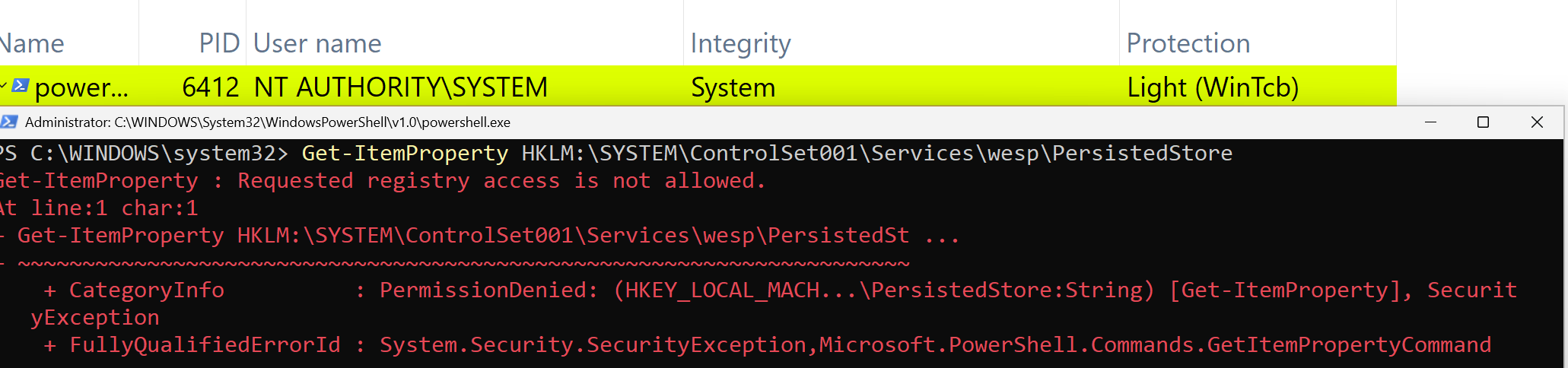
I did not spend much more time trying to access the key directly. The client APIs already gave me a supported path to enumerate and remove registrations, which was all I needed for the POC.
WESP ETW Visibility
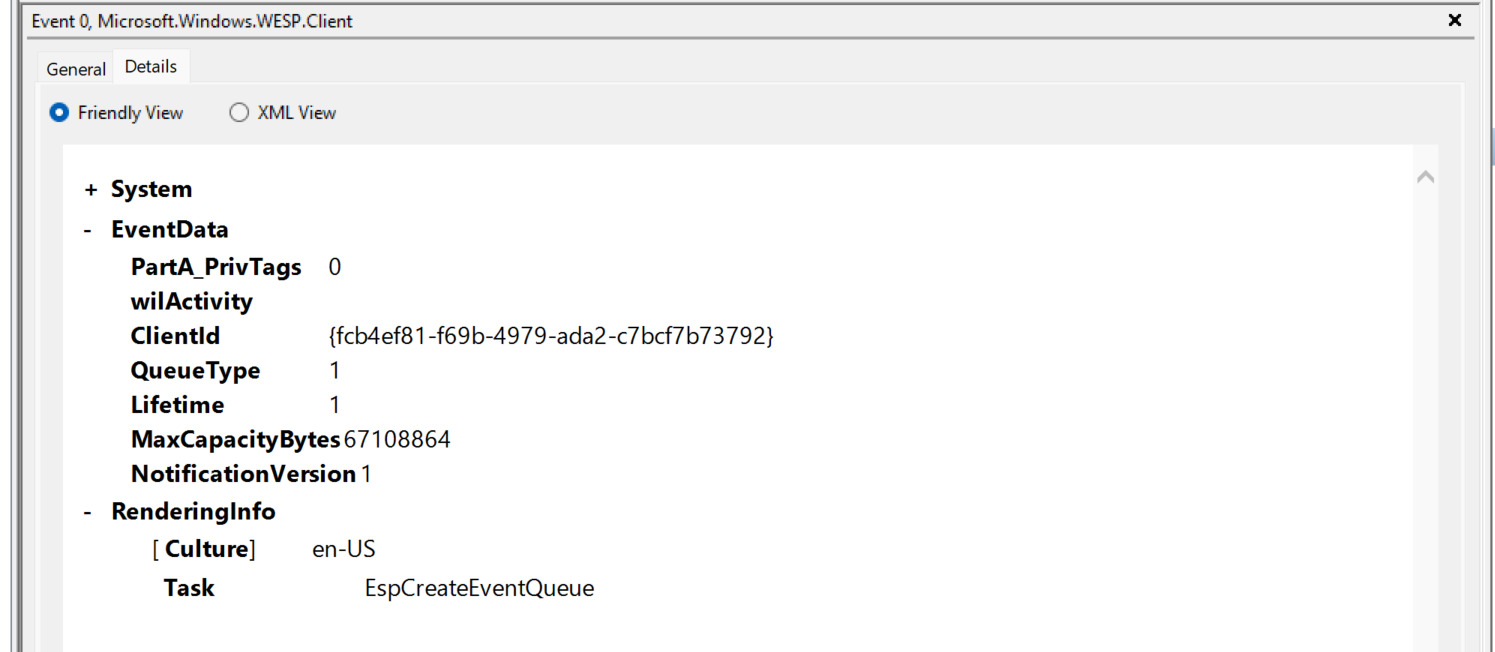
I found one TraceLogging provider in espclient.dll: Microsoft.Windows.WESP.Client. It records client API activity, including queue, rule, and connection operations, with events for both successes and failures.
I used Get-EtwProviders from my ETWInspector module to find it. With the module installed and imported, you can query the DLL like this:
$providers = Get-EtwProviders `
    -ProviderType TraceLogging `
    -FilePath C:\Users\TestUser\Desktop\espclient.dll

$providers.TraceloggingProviders
FilePath Providers
-------- ---------
C:\Users\TestUser\Desktop\espclient.dll {Microsoft.Windows.WESP.Client}The provider and its current event set are also visible in my EtwWatcher snapshot for build 29661. Since this is a preview client DLL, I would expect that schema to move with the API. Below is an example of the EspCreateEventQueue event:
Wrapping Up
It was a ton of fun to get my hands on these first two public WESP binaries and reverse them. Moving out of the kernel is a huge step in Windows and I think a lot of people thought it was further away than it is. I don’t think it is the technology that will take forever, but organizations upgrading their machines. This will take a significant amount of time, but to see how far this has come in about 18 months is incredible.
There is still PLENTY to reverse and dive into. I only touched the surface level of this capability and you will notice there are a lot of cool rules that will be available to vendors that either have the private SDK today or who will. CrowdStrike showed a really cool example of them being able to prevent malware from executing, so I am excited to see more public information around WESP prevention rules.
This will not be the last write-up on these components, as I know many other researchers are looking into this. I would keep an eye on what other Windows researchers find as the preview moves forward, especially Yarden Shafir, who has also been looking at the feature.